Module 5 · Lesson 6 of 6
Testing a Workflow Before It Goes Live Pag-test ng Workflow Bago I-live
Awaiting hands-on verification. The concepts here are sound, but the click-by-click steps have not yet been re-walked in a live GoHighLevel sub-account. GoHighLevel changes often, so a menu name or screen may differ from what you see. Flagged rather than presented as verified.
Before this: Wait Steps and Getting Timing Right
Your knowledge-check score on Wait Steps and Getting Timing Right was under 60%. Worth a quick re-read before this one — it builds on it.
On this page

In this lesson
Testing a Workflow Before It Goes Live
Sa lesson na ’to
Pag-test ng Workflow Bago I-live

Read the transcript
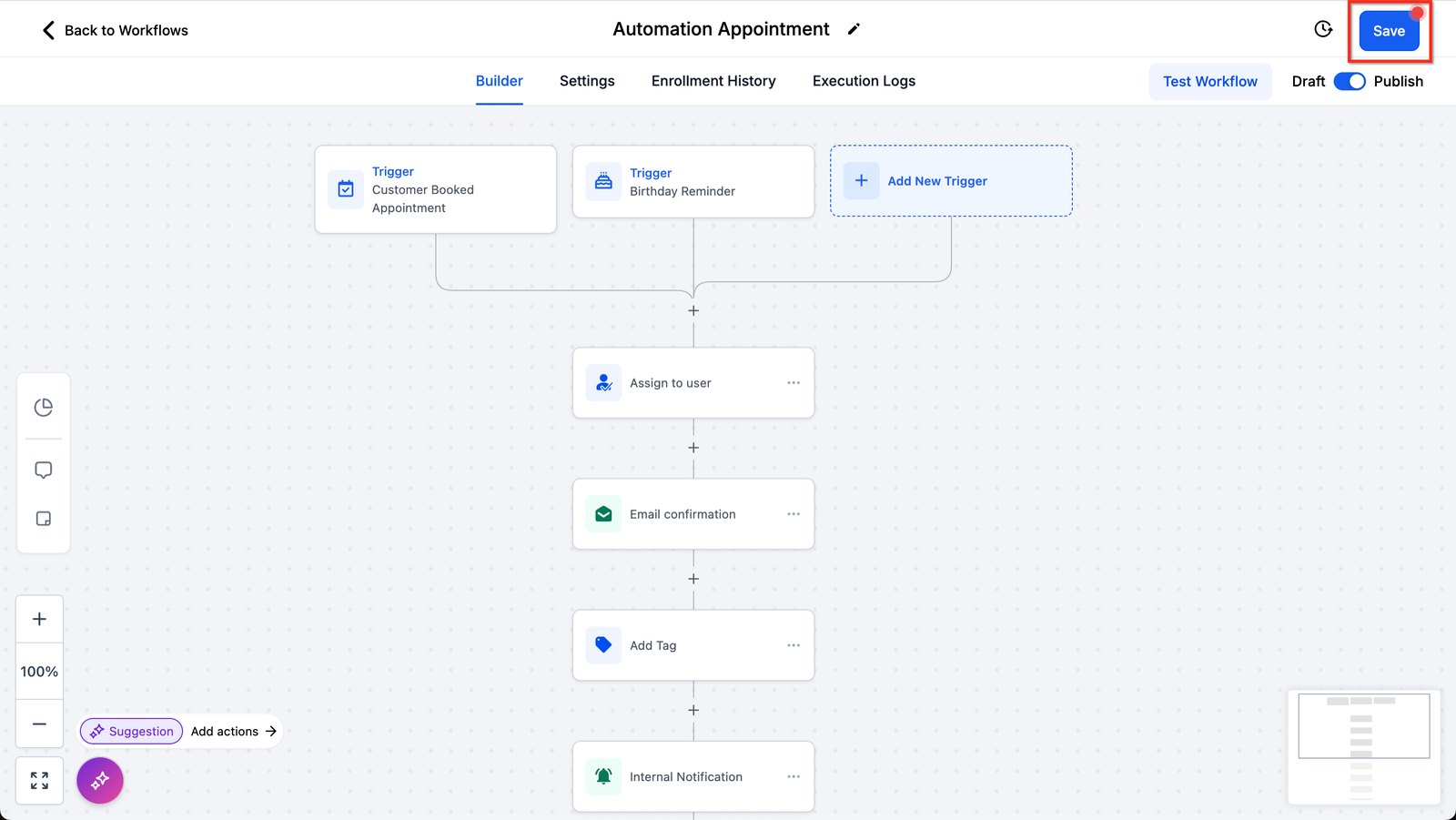
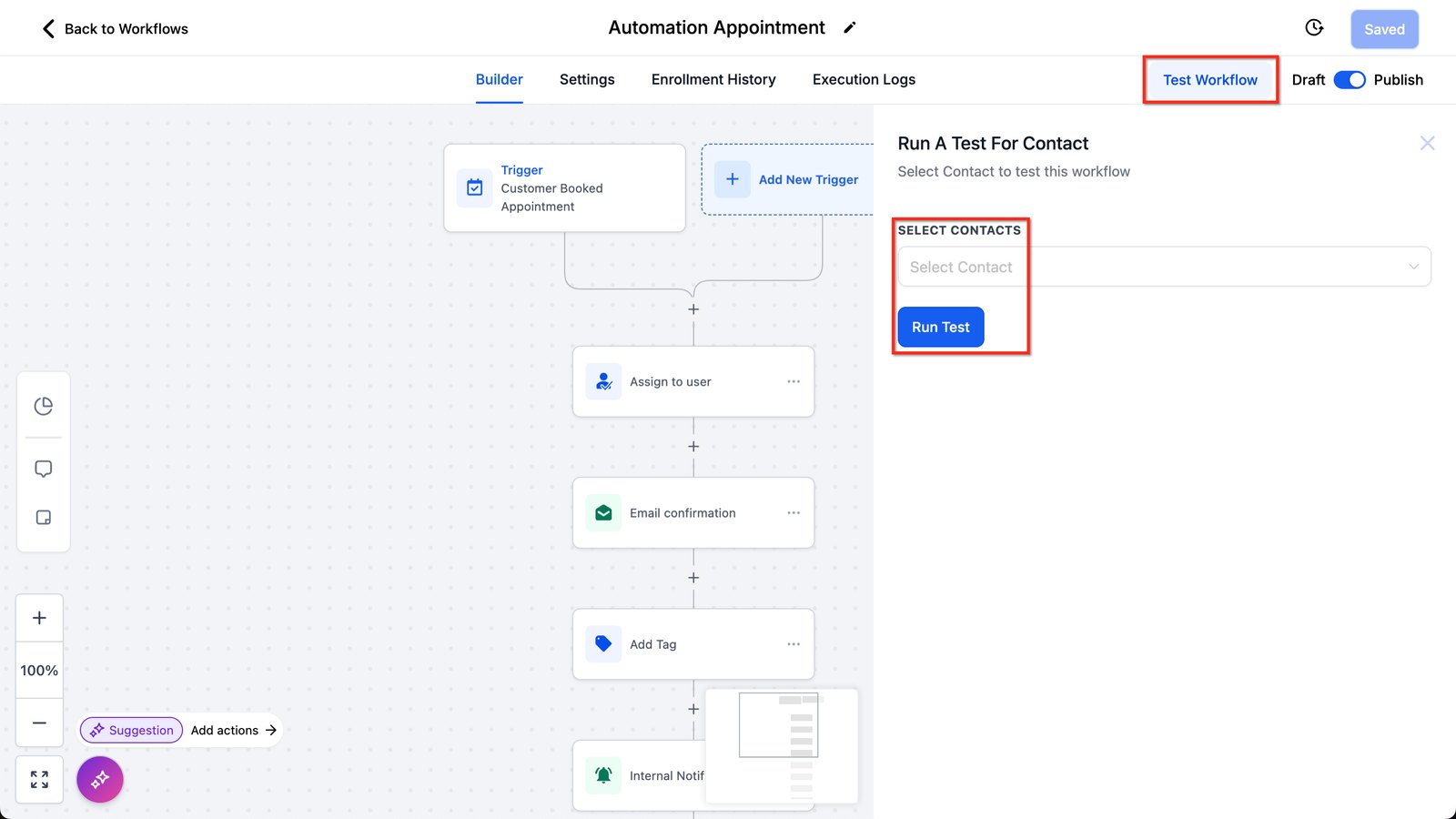
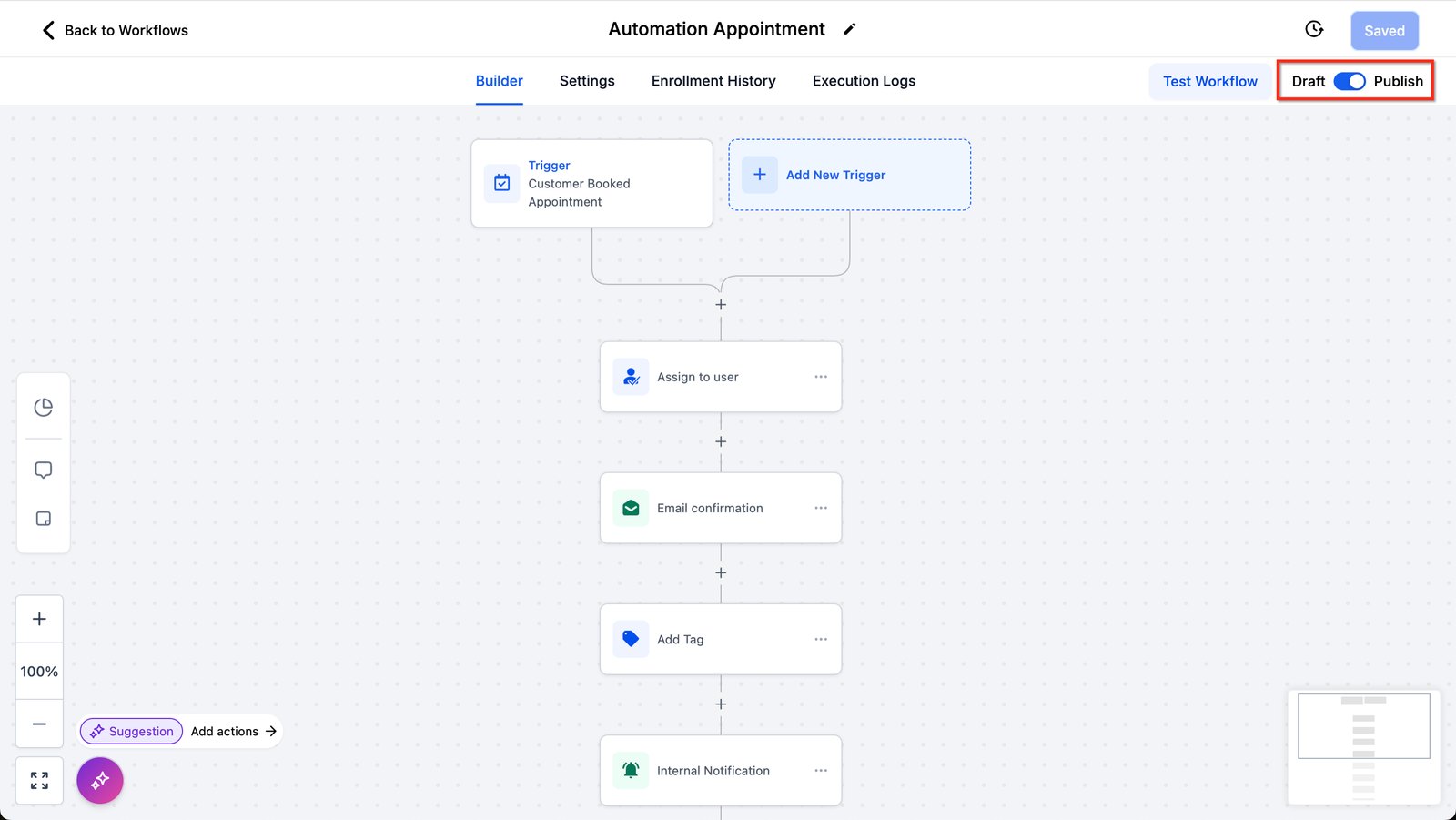
Hi baddie! I'm Hazel. VAs who test before handing over get rehired. Let's test properly. Before testing, click Save so the test runs on your latest changes. Then write your test plan: for each kind of contact, what should happen. Click Test Workflow, select a test contact, then Run Test. Use test contacts with your own email and phone, never real customers. After the test, check Enrollment History and Execution Logs for proof. Only switch from Draft to Publish when every test case passed. Evidence, not vibes. Show the client what you tested. Read the lesson below, then try the practice.
Hi baddie! Si Hazel 'to. Ang VA na nagte-test bago mag-handover, nire-rehire. Mag-test tayo nang tama. Bago mag-test, i-click ang Save para sa latest changes tatakbo ang test. Tapos isulat ang test plan mo: sa bawat klase ng contact, ano ang dapat mangyari. I-click ang Test Workflow, pumili ng test contact, then Run Test. Gumamit ng test contacts na may sarili mong email at phone, hindi totoong customers. Pagkatapos ng test, i-check ang Enrollment History at Execution Logs bilang proof. Saka lang ilipat from Draft to Publish kapag pasado lahat ng test cases. Evidence, hindi vibes. Ipakita sa client kung ano ang tinest mo. Basahin ang lesson sa baba, tapos subukan ang practice.
What you'll learn
- Write a test plan before you test
- Test every path, including the ones you hope never happen
- Read a workflow's history to see what actually ran
- Clean up test data and hand over with confidence
- Gumawa ng test plan bago mag-test
- I-test ang bawat daan, kasama ang mga sana'y hindi mangyari
- Basahin ang history ng workflow para makita kung ano talaga ang tumakbo
- Linisin ang test data at mag-handover nang may kumpiyansa
New words in this lesson
- Enrollment
- When a contact enters a workflow because its trigger fired. The enrollment history shows who entered and which steps ran.
What a client actually asks
"Is it working? I don't want to find out from a customer that it isn't."
Ang tanong ng client
"Gumagana na ba? Ayokong sa customer ko pa malaman na hindi pala."
Key concepts
This lesson looks technical, but it’s really a career lesson. The difference between a VA who gets rehired and one who doesn’t is often whether they test before handing over. Clients forgive slow. They don’t forgive a customer telling them the system is broken.
A test plan is a list of “if this, then that should happen”
Before you test, write down what should happen for each kind of contact. For the inquiry workflow from this module:
| Test case | What should happen |
|---|---|
| Urgent repair inquiry | Team notified · on-call tech texted · opportunity created in New inquiry |
| Quote inquiry | Team notified · opportunity created · follow-up after the wait (shortened for testing) |
| Quote inquiry, books during the wait | Team notified · opportunity created · no follow-up |
| Inquiry with no request type | Team notified · “please review” notification |
The bottom two rows are the ones beginners skip, and they’re where real problems hide.
Use test contacts, never real ones
Create test contacts with your own email and phone, and give them obvious names: TEST Urgent, TEST Quote. Real customers should never receive your test messages, and obvious names make clean-up easy.
Evidence, not vibes
Don’t say “it works” because nothing looked broken. Workflows keep a history of who enrolled and which steps ran, and many steps show detailed logs. After each test, open the history and confirm:
- the test contact enrolled
- they took the path you expected
- every action shows as completed — and if one failed, the log usually says why
Step-by-step test pass
Test your two live workflows, Maria-Practice Nurture-024 and
Maria-Practice Hot Lead-024, with this plan. (You’ll test the appointment
workflows the same way in Lesson 19.)
| If this happens… | …this should happen |
|---|---|
| Contact one submits your form | Tag added, opportunity in New Lead, email 1 arrives with a working booking link |
| Contact one doesn’t reply | Emails 2 and 3 arrive after the (shortened) waits |
| Contact two submits, then replies to email 1 | Opportunity moves to Hot Lead, you’re notified with the reply, emails 2 and 3 never come |
| Contact one submits the form again | They go through the nurture again (re-entry is on) |
Write the test plan table for your workflow, like the one above. One row per path.
Shorten long waits temporarily and label them (Lesson 16).
Create your test contacts with your own email and phone.
Run each test case through the real trigger — submit the real form, book on the real calendar. Don’t enroll by hand unless that’s the only way to reach a path.
Check the history after each one, against your table. Tick each row only when you’ve seen the evidence.
Check what the contact received on your phone and in your inbox. Read it as a customer would. Any blank merge fields? Odd timing?
Clean up: restore real wait times, delete your own test contacts and test opportunities (only yours), and confirm both workflows are published.
What to tell the client
Send a short, specific message: “Tested all four paths: new lead, no reply, reply during the nurture, and a repeat form fill. All behaved as expected. Test data removed. It’s live.” That message is worth more to your reputation than the workflow itself.
Mga pangunahing konsepto
Mukhang technical ang lesson na ‘to, pero career lesson talaga ito. Ang pagkakaiba ng VA na nire-rehire at hindi ay madalas kung nagte-test sila bago mag-handover. Napapatawad ng clients ang mabagal. Hindi nila napapatawad ang customer na nagsasabing sira ang system.
Ang test plan ay listahan ng “kung ganito, dapat ganyan ang mangyari”
Bago mag-test, isulat kung ano ang dapat mangyari para sa bawat klase ng contact. Para sa inquiry workflow mula sa module na ‘to:
| Test case | Dapat mangyari |
|---|---|
| Urgent repair inquiry | Na-notify ang team · na-text ang on-call tech · may opportunity sa New inquiry |
| Quote inquiry | Na-notify ang team · may opportunity · follow-up pagkatapos ng wait (pinaikli para sa testing) |
| Quote inquiry, nag-book habang naghihintay | Na-notify ang team · may opportunity · walang follow-up |
| Inquiry na walang request type | Na-notify ang team · “please review” na notification |
Ang huling dalawang row ang nilalaktawan ng beginners, at doon nagtatago ang totoong problema.
Gumamit ng test contacts, hindi kailanman ng totoo
Gumawa ng test contacts gamit ang sarili mong email at phone, at bigyan sila ng halatang pangalan: TEST Urgent, TEST Quote. Hindi dapat kailanman makatanggap ng test messages mo ang totoong customers, at pinapadali ng halatang pangalan ang clean-up.
Ebidensya, hindi pakiramdam
Huwag sabihing “gumagana na” dahil lang walang mukhang sira. May history ang workflows kung sino ang na-enroll at aling steps ang tumakbo, at maraming steps ang may detalyadong logs. Pagkatapos ng bawat test, buksan ang history at kumpirmahin:
- na-enroll ang test contact
- dumaan sila sa daang inaasahan mo
- bawat action ay completed — at kung may nag-fail, kadalasan sinasabi ng log kung bakit
Test pass, step by step
I-test ang dalawang live workflow mo, ang Maria-Practice Nurture-024 at
Maria-Practice Hot Lead-024, gamit ang plan na ito. (Ganito rin ang pag-test mo sa
appointment workflows sa Lesson 19.)
| Kung mangyari ito… | …ito dapat ang mangyari |
|---|---|
| Nag-submit ng form mo si contact one | May tag, opportunity sa New Lead, dumating ang email 1 na may gumaganang booking link |
| Hindi nag-reply si contact one | Dumating ang emails 2 at 3 pagkatapos ng (pinaikling) waits |
| Nag-submit si contact two, tapos nag-reply sa email 1 | Lumipat ang opportunity sa Hot Lead, na-notify ka kasama ang reply, hindi na dumating ang emails 2 at 3 |
| Nag-submit ulit ng form si contact one | Dadaan ulit sila sa nurture (naka-on ang re-entry) |
Isulat ang test plan table para sa workflow mo, gaya ng nasa itaas. Isang row bawat daan.
Pansamantalang paikliin ang mahahabang waits at lagyan ng label (Lesson 16).
Gumawa ng test contacts gamit ang sarili mong email at phone.
Patakbuhin ang bawat test case sa totoong trigger — i-submit ang totoong form, mag-book sa totoong calendar. Huwag mano-manong mag-enroll maliban kung ‘yon lang ang paraan para maabot ang isang daan.
I-check ang history pagkatapos ng bawat isa, ikumpara sa table mo. I-tsek lang ang row kapag nakita mo na ang ebidensya.
I-check ang natanggap ng contact sa phone at inbox mo. Basahin na parang customer. May blangkong merge fields ba? Kakaibang timing?
Maglinis: ibalik ang totoong wait times, i-delete ang sarili mong test contacts at test opportunities (sa’yo lang), at kumpirmahing naka-publish ang dalawang workflow.
Ano ang sasabihin sa client
Magpadala ng maikli at specific na message: “Tinest ko ang lahat ng apat na daan: bagong lead, walang reply, nag-reply habang nasa nurture, at umulit mag-fill in ng form. Lahat ay gumana gaya ng inaasahan. Natanggal na ang test data. Live na.” Mas malaki ang halaga ng message na ‘yan sa reputasyon mo kaysa sa workflow mismo.
Common mistakes
- Ang happy path lang ang tine-test
- Gumagana ang urgent branch — ayos. Paano ang quote branch, ang walang lamang field, ang taong nag-book habang naghihintay? I-test ang bawat daang ginawa mo.
- Nagte-test gamit ang contact ng totoong customer
- Gumamit ng test contact na may sarili mong email at phone. Hindi dapat kailanman makatanggap ng test messages mo ang totoong customers.
- Sinasabing "gumagana na" nang walang ebidensya
- I-check ang history o logs at kumpirmahing tumakbo ang bawat action. Hindi test result ang "Sinubmit ko at walang nasira."
- Iniiwan ang test timing at test data
- Ibalik ang totoong wait times, tanggalin ang test contacts o malinaw na i-tag, at i-double-check na naka-publish ang workflow bago mag-handover.
- Testing only the happy path
- The urgent branch works — great. What about the quote branch, the empty field, the person who books mid-wait? Test every path you built.
- Testing with a real customer's contact
- Use a test contact with your own email and phone. Real customers should never receive your test messages.
- Saying "it works" without evidence
- Check the history or logs and confirm each action ran. "I submitted it and nothing broke" isn't a test result.
- Leaving test timing and test data behind
- Restore real wait times, remove test contacts or tag them clearly, and double-check the workflow is published before you hand over.
Practice
🔒 Practice opens once you've completed every lesson in Learn.
Ready for a harder one? Try a real client scenario
Knowledge check
5 quick questions. You'll see why each answer is right or wrong as you go, and you can retake it as often as you like.