Module 5 · Lesson 5 of 6
Wait Steps and Getting Timing Right Wait Steps at Pagtama ng Timing
Awaiting hands-on verification. The concepts here are sound, but the click-by-click steps have not yet been re-walked in a live GoHighLevel sub-account. GoHighLevel changes often, so a menu name or screen may differ from what you see. Flagged rather than presented as verified.
Before this: Filters and If/Else Branches
Your knowledge-check score on Filters and If/Else Branches was under 60%. Worth a quick re-read before this one — it builds on it.
On this page

In this lesson
Wait Steps and Getting Timing Right
Sa lesson na ’to
Wait Steps at Pagtama ng Timing

Read the transcript
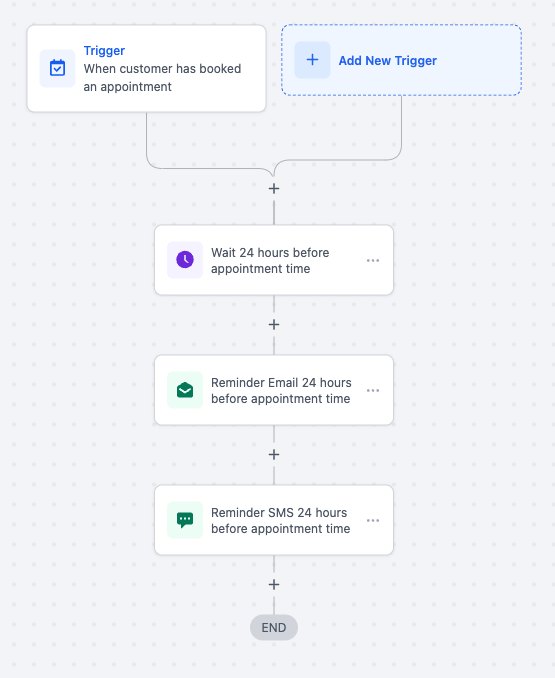
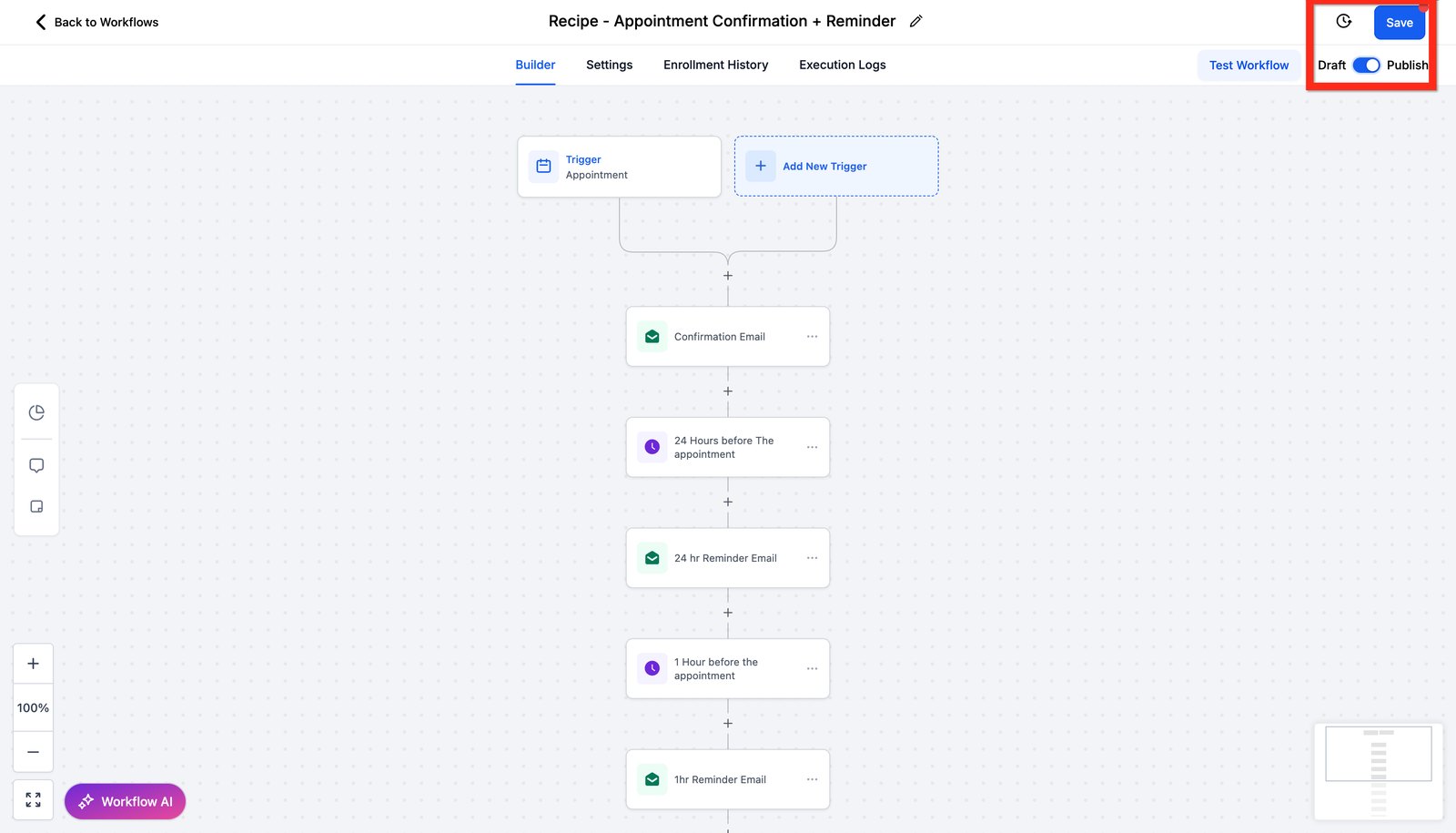
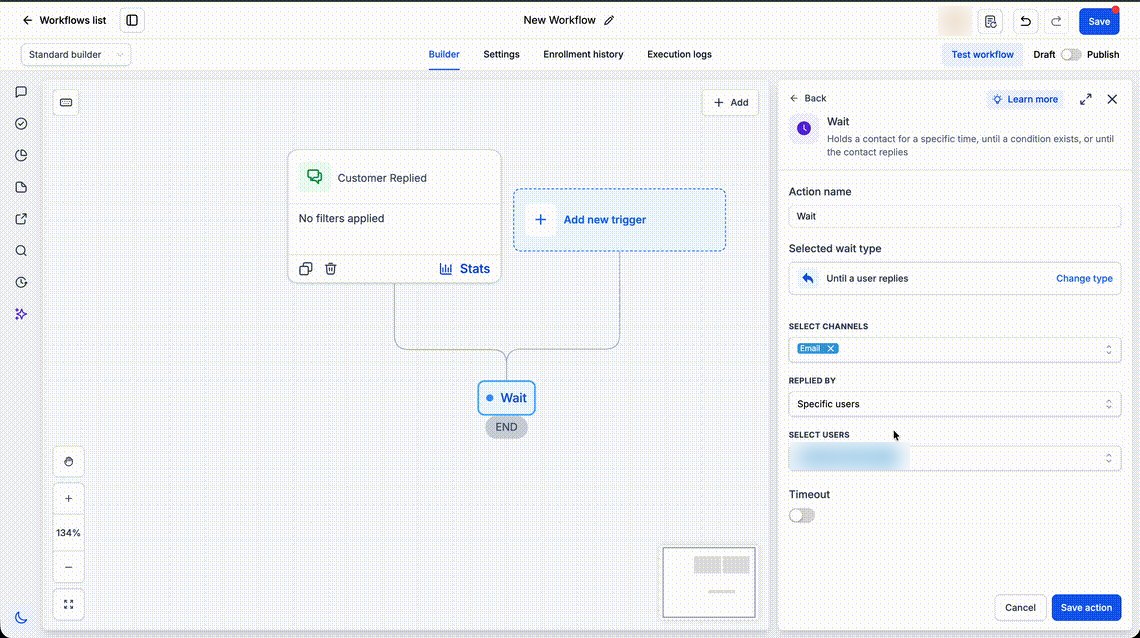
Hi baddie! I'm Hazel. A wait step pauses a contact before the next action. Timing is everything. Here, the workflow waits until 24 hours before the appointment. Then it sends the reminder email and the reminder SMS. A full sequence can use several waits: 24 hours before, then 1 hour before. Waits count real time in the account's time zone. Then Save and Publish. A wait can also hold until something happens. This one waits for a reply on Email. After any wait, check before you send. The lead may have booked or replied already. Wait, check, then send. That's the pattern. Read the lesson below, then try the practice.
Hi baddie! Si Hazel 'to. Pinapahinto muna ng wait step ang contact bago ang susunod na action. Timing is everything. Dito, maghihintay ang workflow hanggang 24 hours bago ang appointment. Tapos ise-send ang reminder email at reminder SMS. Pwedeng maraming waits sa isang buong sequence: 24 hours before, tapos 1 hour before. Real time ang bilang ng waits, sa time zone ng account. Then Save at Publish. Pwede ring maghintay hanggang may mangyari. Ito, hinihintay ang reply sa Email. Pagkatapos ng wait, i-check muna bago mag-send. Baka nag-book o nag-reply na ang lead. Wait, check, tapos send. 'Yan ang pattern. Basahin ang lesson sa baba, tapos subukan ang practice.
What you'll learn
- Add a time delay between actions
- Choose between a fixed delay and waiting for an event
- Stop follow-ups when the lead has already replied or booked
- Respect business hours and the account time zone
- Add timed follow-up emails to your Nurture workflow
- Magdagdag ng time delay sa pagitan ng actions
- Pumili sa pagitan ng fixed delay at paghihintay ng event
- Itigil ang follow-ups kapag sumagot o nag-book na ang lead
- Igalang ang business hours at ang time zone ng account
- Magdagdag ng naka-timing na follow-up emails sa Nurture workflow mo
New words in this lesson
- Wait step
- A workflow step that pauses a contact for a set time, until an event, or until a time relative to an appointment.
What a client actually asks
"Follow up three days after they inquire if they haven't booked yet. Not straight away — we tried that and it felt pushy."
Ang tanong ng client
"Mag-follow up tatlong araw pagka-inquire nila kung hindi pa sila nagbu-book. Hindi agad-agad — sinubukan na namin 'yon at parang ang kulit."
Key concepts
A wait step pauses a contact at that point in the workflow before moving on. Remember the corridor from Lesson 12: a wait is a bench in the corridor. The contact sits there while others walk past.
Two kinds of waiting
| Kind | Question it answers | Example |
|---|---|---|
| Fixed delay | How long until the next step? | Wait 3 days |
| Wait for something | Has X happened yet? | Wait until they reply, or a set time passes |
GHL’s wait step can do both, plus timing relative to an appointment (that’s Lesson 19). The labels change between builder versions, but the idea is the same: pause until a time, or until an event.
The check after the wait
The client at the top of the page said something important: “if they haven’t booked yet.” That’s a condition, and it has to be checked after the wait, not before.
A contact inquires on Monday. On Wednesday they book a call. On Thursday your three-day wait ends — and if nothing checks, they get a “Still interested?” message from a business they’ve already booked with. That looks careless.
So the pattern is:
- Wait 3 days
- If/Else: has the contact booked (or replied)?
- Only if not → send the follow-up
Time zones and business hours
Waits count real time in the account’s time zone (Lesson 3). A 24-hour wait from an 11pm inquiry ends at 11pm. Many wait and message steps have options to only send within certain hours or days. Use them for anything a customer receives.
Step-by-step build
Your Nurture workflow sends one email. A nurture needs a few, spaced out, until the lead books. You’ll add two follow-ups. Two things already stop it at the right time:
- They reply: stop on response (Lesson 14) ends the nurture.
- They book: your Booked Call workflow (Lesson 19) will take them out of the nurture.
Open
Maria-Practice Nurture-024and find the end, after the first email.Add a wait step set to 1 day. If the option exists, limit the next message to business hours.
Add the second email: a short, friendly reminder with your booking link (the
Maria-Practice Booking URL-024custom value again).Add a wait step set to 2 days, then a third email: a last, gentle note that the link is there whenever they’re ready.
For testing only, change both waits to 2 minutes and write “TEST TIMING: change back” in each step’s name.
- Save and publish.
Check what you built
Run two test submissions through your form. GHL matches contacts by email or
phone, so for the second one use a plus address like
you+2@gmail.com (it still reaches your inbox) and change the last
digit of the phone number. Nothing is texted, so that’s safe:
- Contact one: don’t reply. All three emails should arrive, a couple of minutes apart.
- Contact two: reply to the first email. The other two should never arrive.
Then set the waits back to 1 day and 2 days, remove the test notes, and publish again.
Mga pangunahing konsepto
Pinapahinto muna ng wait step ang contact sa puntong ‘yon ng workflow bago tumuloy. Tandaan ang pasilyo mula sa Lesson 12: ang wait ay bangko sa pasilyo. Nakaupo doon ang contact habang dumadaan ang iba.
Dalawang klase ng paghihintay
| Klase | Tanong na sinasagot | Halimbawa |
|---|---|---|
| Fixed delay | Gaano katagal bago ang susunod na step? | Maghintay ng 3 araw |
| Maghintay ng isang bagay | Nangyari na ba ang X? | Maghintay hanggang sumagot sila, o lumipas ang takdang oras |
Kayang gawin ng wait step ng GHL ang dalawa, pati timing na nakabatay sa appointment (Lesson 19 ‘yan). Nagbabago ang labels sa bawat version ng builder, pero pareho ang ideya: huminto hanggang sa isang oras, o hanggang sa isang event.
Ang check pagkatapos ng wait
May mahalagang sinabi ang client sa itaas: “kung hindi pa sila nagbu-book.” Condition ‘yan, at kailangan itong i-check pagkatapos ng wait, hindi bago.
Nag-inquire ang isang contact noong Monday. Noong Wednesday, nag-book sila ng call. Noong Thursday, natapos ang three-day wait mo — at kung walang nagche-check, makakatanggap sila ng “Interested pa ba kayo?” mula sa business na nabook na nila. Mukhang pabaya.
Kaya ganito ang pattern:
- Maghintay ng 3 araw
- If/Else: nag-book (o sumagot) na ba ang contact?
- Kung hindi pa lang → ipadala ang follow-up
Time zones at business hours
Totoong oras ang binibilang ng waits sa time zone ng account (Lesson 3). Ang 24-hour wait mula sa inquiry nang 11pm ay matatapos nang 11pm. Maraming wait at message steps ang may options na magpadala lang sa loob ng ilang oras o araw. Gamitin ang mga ‘yan sa kahit anong matatanggap ng customer.
Pag-build, step by step
Isang email lang ang pinapadala ng Nurture workflow mo. Ang nurture ay kailangan ng ilang emails, may pagitan, hanggang mag-book ang lead. Magdadagdag ka ng dalawang follow-up. May dalawang bagay na nagpapatigil na dito sa tamang oras:
- Nag-reply sila: tinatapos ng stop on response (Lesson 14) ang nurture.
- Nag-book sila: ilalabas sila sa nurture ng Booked Call workflow mo (Lesson 19).
Buksan ang
Maria-Practice Nurture-024at hanapin ang dulo, pagkatapos ng unang email.Magdagdag ng wait step na 1 araw. Kung may option, limitahan ang susunod na message sa business hours.
Idagdag ang pangalawang email: maikli at friendly na paalala na may booking link mo (ang custom value na
Maria-Practice Booking URL-024ulit).Magdagdag ng wait step na 2 araw, tapos ng pangatlong email: huling, mahinahong paalala na nandiyan lang ang link kapag handa na sila.
Para sa testing lang, gawing 2 minuto ang dalawang wait at isulat ang “TEST TIMING: change back” sa pangalan ng bawat step.
- I-save at i-publish.
I-check ang ginawa mo
Magpatakbo ng dalawang test submission sa form mo. Tinutugma ng GHL ang contacts
ayon sa email o phone, kaya sa pangalawa, gumamit ng plus address gaya ng
you+2@gmail.com (sa inbox mo pa rin dumarating) at palitan ang huling
digit ng phone number. Walang ite-text, kaya ligtas ‘yan:
- Contact one: huwag mag-reply. Dapat dumating ang tatlong email, ilang minuto ang pagitan.
- Contact two: mag-reply sa unang email. Hindi na dapat dumating ang dalawa pa.
Tapos ibalik ang waits sa 1 araw at 2 araw, tanggalin ang test notes, at i-publish ulit.
Common mistakes
- Nagfa-follow up kahit nag-book na ang lead
- Pagkatapos ng wait, i-check muna kung nag-book o sumagot na sila bago magpadala. Kung hindi, hinahabol mo ang taong nag-oo na.
- Tine-test ang 3-day wait sa paghihintay ng 3 araw
- Pansamantalang paikliin ang wait sa isa o dalawang minuto habang nagte-test, tapos ibalik ang totoong value bago i-publish. Mag-iwan ng note para hindi mo makalimutan.
- Binabalewala ang time zones at business hours
- Ang 24-hour wait mula sa inquiry nang 11pm ay magpapadala nang 11pm. I-check ang time zone ng account at gamitin ang time-window options kung dapat sa araw lang lumalabas ang messages.
- Ine-edit ang waits sa live workflow nang hindi iniisip kung sino ang naghihintay pa
- Ang contacts na naghihintay na ay baka sumunod sa lumang timing o kumilos nang hindi inaasahan. Maingat na baguhin ang timing, at i-check ang enrollment history pagkatapos.
- Following up even after the lead has booked
- After the wait, check whether they've already booked or replied before sending. Otherwise you chase someone who already said yes.
- Testing a 3-day wait by waiting 3 days
- Temporarily shorten the wait to a minute or two while testing, then put the real value back before publishing. Write a note so you don't forget.
- Ignoring time zones and business hours
- A 24-hour wait from an 11pm inquiry sends at 11pm. Check the account time zone and use the time-window options if messages should only go out during the day.
- Editing waits in a live workflow without thinking about who's mid-wait
- Contacts already waiting may follow the old timing or behave unexpectedly. Make timing changes carefully, and check the enrollment history afterward.
Practice
🔒 Practice opens once you've completed every lesson in Learn.
Ready for a harder one? Try a real client scenario
Knowledge check
5 quick questions. You'll see why each answer is right or wrong as you go, and you can retake it as often as you like.