Module 5 · Lesson 4 of 6
Filters and If/Else Branches Filters at If/Else Branches
Awaiting hands-on verification. The concepts here are sound, but the click-by-click steps have not yet been re-walked in a live GoHighLevel sub-account. GoHighLevel changes often, so a menu name or screen may differ from what you see. Flagged rather than presented as verified.
Before this: Workflow Actions
Your knowledge-check score on Workflow Actions was under 60%. Worth a quick re-read before this one — it builds on it.
On this page

In this lesson
Filters and If/Else Branches
Sa lesson na ’to
Filters at If/Else Branches

Read the transcript
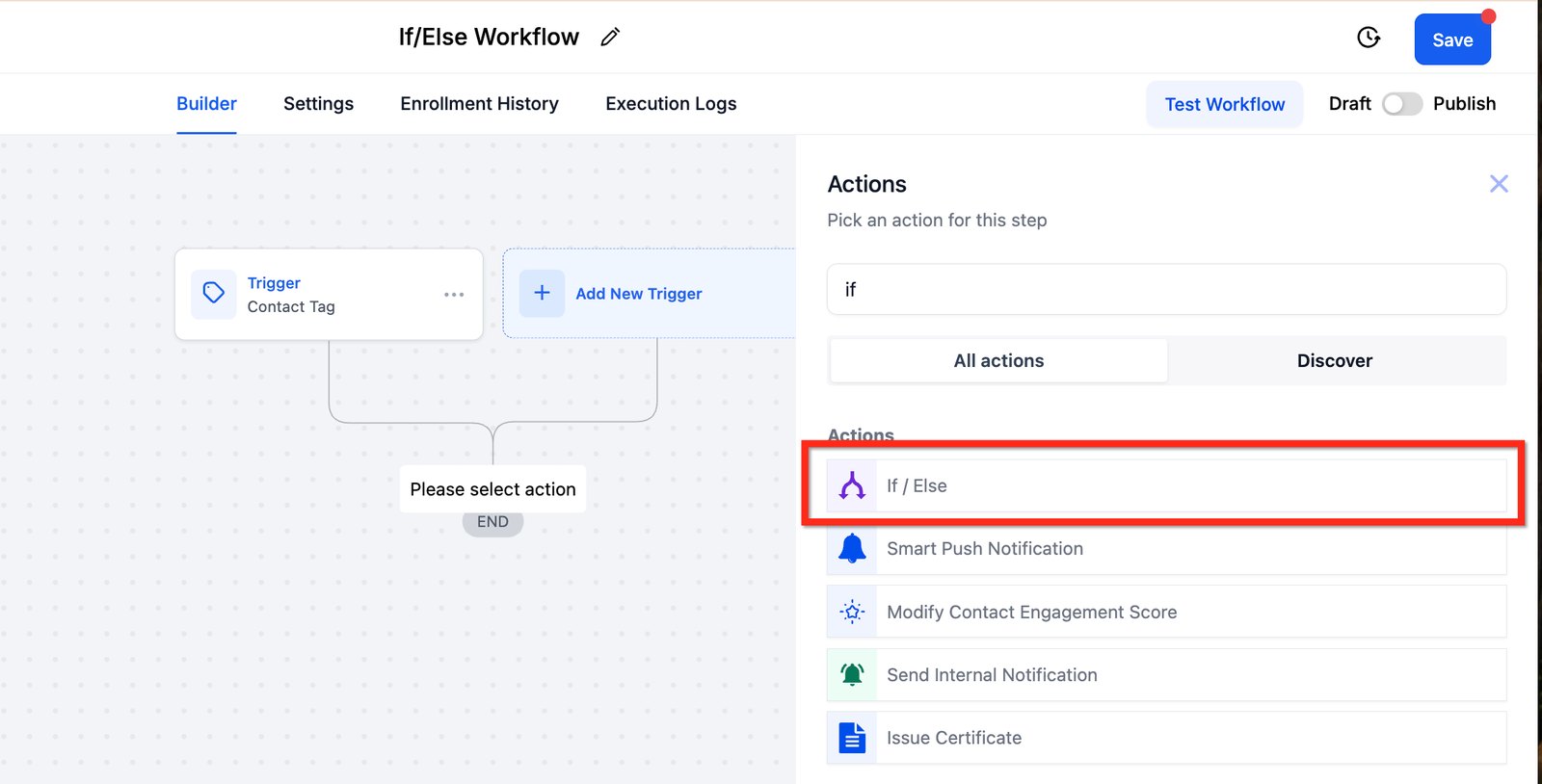
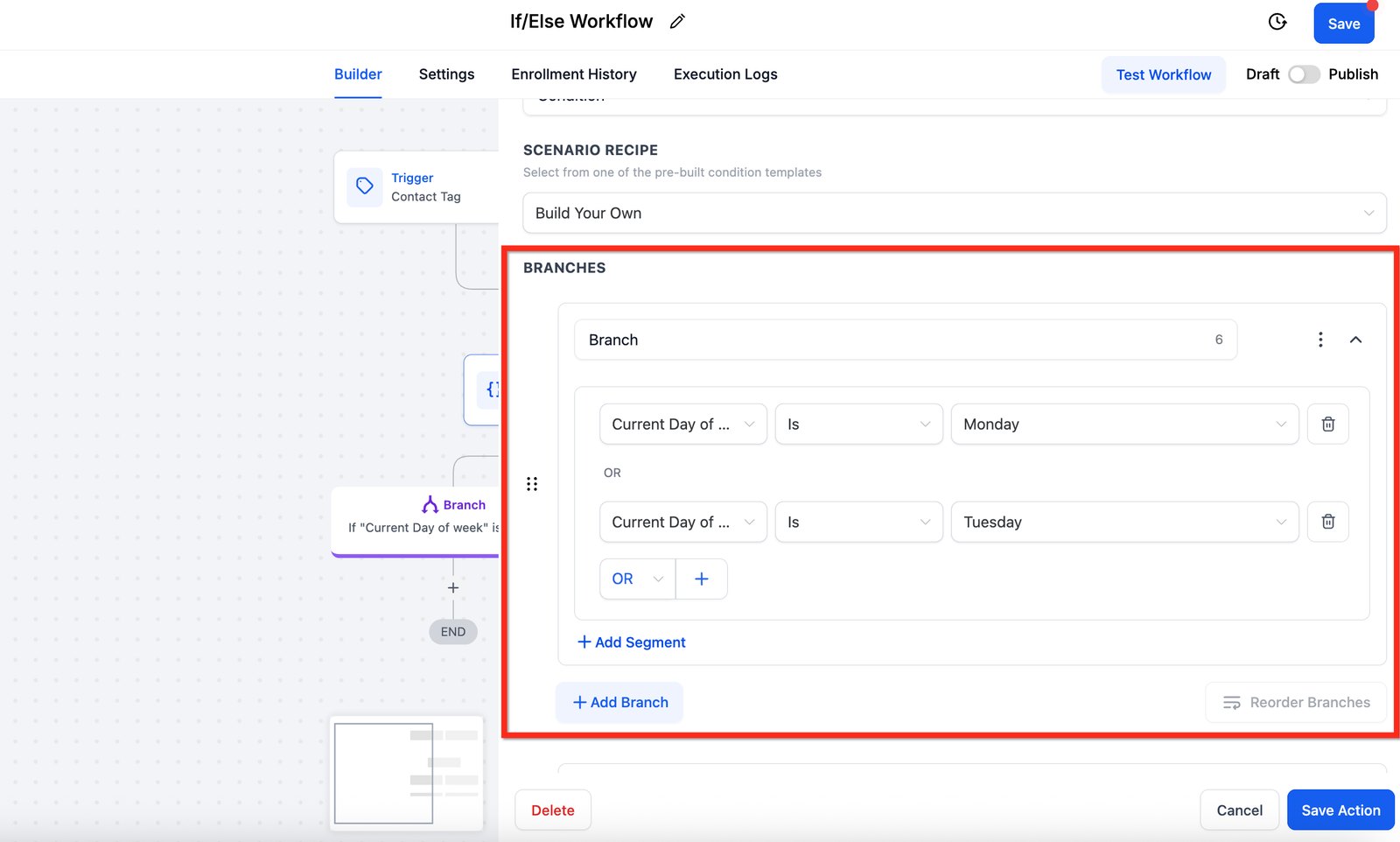
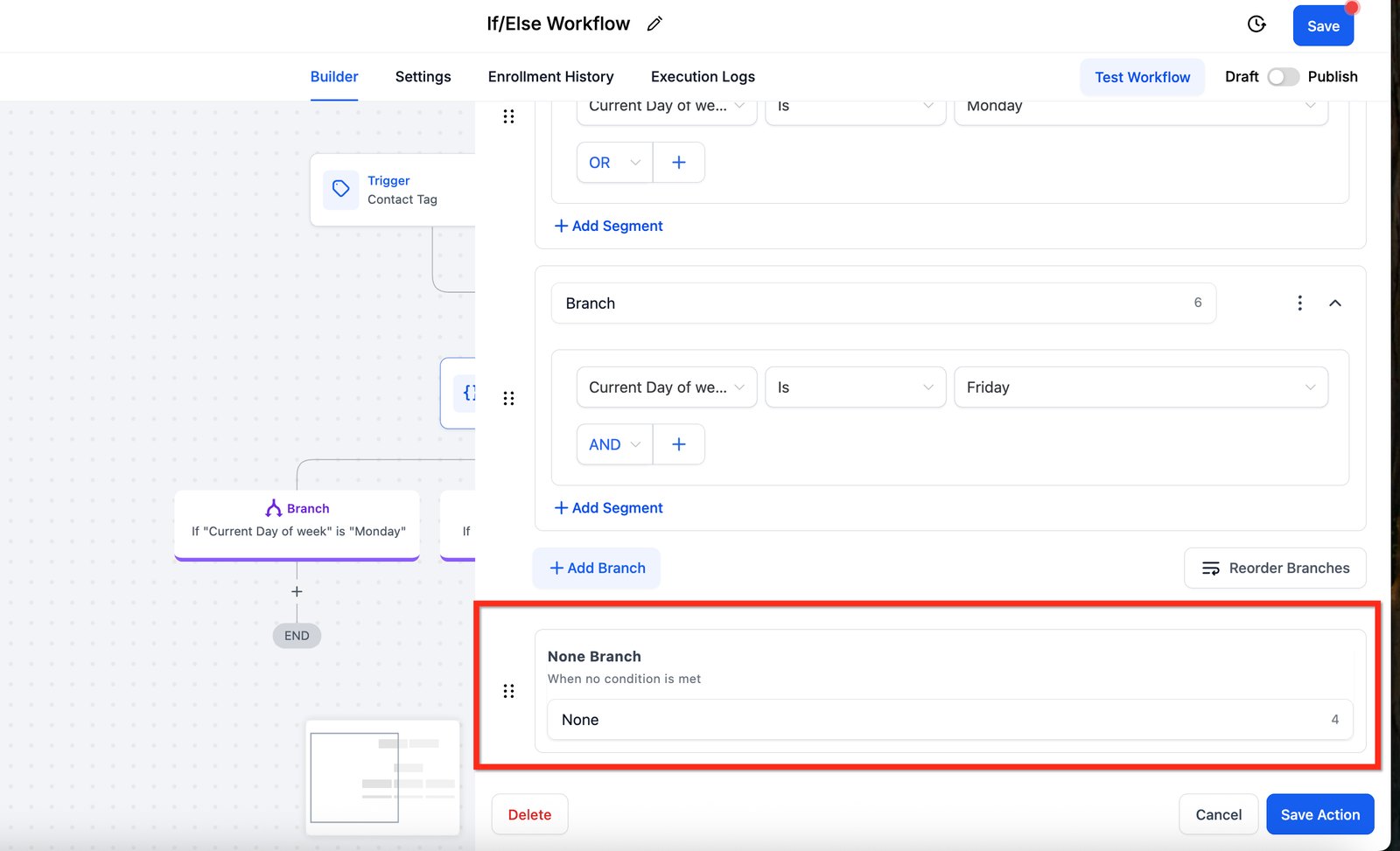
Hi baddie! I'm Hazel. When every contact matters but needs a different path, use an If/Else branch. Add an action and search for if. Pick If / Else. A trigger filter decides who enters. A branch decides which path they take. Each branch has conditions. Here: if the day is Monday or Tuesday. Branch on structured data, like a dropdown field, so the condition always matches. The None Branch is for contacts that match no condition. Never leave it empty. At least notify someone, or those leads are silently dropped. Always plan the none of the above path. Read the lesson below, then try the practice.
Hi baddie! Si Hazel 'to. Kung importante ang bawat contact pero iba-iba ang daan, If/Else branch ang gamitin. Mag-add ng action at i-search ang if. Piliin ang If / Else. Ang trigger filter, nagde-decide kung sino ang papasok. Ang branch, kung aling daan ang dadaanan. Bawat branch may conditions. Dito: kung Monday o Tuesday ang araw. Mag-branch sa structured data, tulad ng dropdown field, para laging tugma ang condition. Ang None Branch ay para sa contacts na walang tugmang condition. Huwag itong iwanang empty. Kahit mag-notify man lang ng tao, kundi tahimik na mawawala ang leads. Laging planuhin ang none of the above na daan. Basahin ang lesson sa baba, tapos subukan ang practice.
What you'll learn
- Know when to use a trigger filter and when to use an If/Else branch
- Branch a workflow on a custom field value
- Always plan the "none of the above" branch
- Keep branches readable for the next person
- Build your Hot Lead workflow, with a branch so it only acts on your own leads
- Malaman kung kailan gagamit ng trigger filter at kailan ng If/Else branch
- I-branch ang workflow batay sa value ng custom field
- Laging iplano ang "none of the above" na branch
- Panatilihing madaling basahin ang branches para sa susunod na hahawak
- I-build ang Hot Lead workflow mo, na may branch para leads mo lang ang inaasikaso nito
New words in this lesson
- If/Else
- A workflow step that sends contacts down different paths based on a condition, such as the value of a custom field.
What a client actually asks
"Quote requests should get a friendly follow-up, but urgent repairs need the on-call tech texted straight away. Same form, different follow-up."
Ang tanong ng client
"Dapat friendly na follow-up ang matanggap ng quote requests, pero sa urgent repairs, kailangang ma-text agad ang on-call tech. Iisang form, magkaibang follow-up."
Key concepts
Sometimes a workflow should treat contacts differently based on what you know about them. There are two tools for that, and they do different jobs.
Filter vs branch
| Trigger filter | If/Else branch | |
|---|---|---|
| Question it answers | Should this contact enter at all? | Which path should this contact take? |
| Contacts that don’t match | Never enter the workflow | Enter, but take a different path |
| Use it when | Only some cases matter | Every case matters, but differently |
The client at the top of the page wants every inquiry followed up, just differently. That’s a branch, not a filter. A filter on “urgent only” would silently ignore every quote request.
Branch on structured data
An If/Else checks a condition on the contact. This is where Module 2 pays off: because Request type is a radio field with exactly two values, the branch is easy and reliable:
- If Request type is Urgent repair → text the on-call tech immediately
- Else if Request type is Quote → send the friendly follow-up
- None of the above → ?
If Request type were a free-text field, you’d be guessing at “urgent”, “URGENT”, “asap!!” and “emergency”. This is why data structure comes before automation.
Always plan “none of the above”
Every branch has a default path for contacts that match no condition: the field was empty, someone was added by hand, a new option was added later. If that path does nothing, those leads are silently dropped.
At minimum, the default path should notify someone: “Inquiry came in without a request type — please check.” That one action has saved many a client relationship.
Step-by-step build
The examples above use urgent and quote branches. Your practice build is a different request, and it uses a branch for a reason that only exists in a shared account:
“When a lead replies to our emails, move them up to Hot Lead and tell me what they said, straight away. And stop sending them the follow-up emails.”
The trigger for this is Customer replied. In the practice sub-account, any
student’s lead replying would start it, so the first step is a branch that asks:
is this my lead? Your Nurture workflow tags every one of your leads
maria-practice-024, so that’s the condition.
Create a new workflow from scratch inside your folder and name it
Maria-Practice Hot Lead-024.Add the trigger Customer replied.
Add an If/Else step. In the actions list it’s called If / else (search “condition” to find it). Rename the first branch “My lead”. Condition: Tags → Includes →
maria-practice-024.In the “My lead” branch, move the deal. Add the create-or-update opportunity action: pipeline
Maria-Practice pipeline-024, stage Hot Lead.Still in “My lead”, notify yourself. Add Send internal notification, type Email. For To User Type choose Particular user and pick yourself. Never choose “All users”: in the shared practice account that emails every student. (On a client account, pick the business owner.) Include the contact’s name and the reply itself: in the field picker, choose Message → Message Body.
Name the default path “Not my lead: do nothing”. This is the one case where an empty default path is right, because those leads belong to other students. Naming it says you meant it.
- Save and publish.
Stop the nurture when a lead replies. Open
Maria-Practice Nurture-024, go to its settings, turn on stop on response, and save.
Check what you built
Find the first nurture email in your inbox and reply to it. Then check:
- the opportunity moved from New Lead to Hot Lead
- you got the notification, and it shows the words you replied with
- in the Hot Lead workflow’s history, your contact went down “My lead”
If the notification arrived but the message part is blank, the field you inserted isn’t the reply’s message body. Pick it again from the picker.
Mga pangunahing konsepto
Minsan, dapat magkakaiba ang trato ng workflow sa contacts ayon sa alam mo tungkol sa kanila. Dalawang tool ang para diyan, at magkaiba ang trabaho nila.
Filter o branch?
| Trigger filter | If/Else branch | |
|---|---|---|
| Tanong na sinasagot | Dapat bang pumasok ang contact na ‘to? | Aling daan ang dapat tahakin ng contact na ‘to? |
| Contacts na hindi tugma | Hindi kailanman papasok sa workflow | Papasok, pero sa ibang daan |
| Gamitin kapag | Ilang kaso lang ang mahalaga | Mahalaga ang bawat kaso, pero magkakaiba |
Gusto ng client sa itaas na ma-follow up ang bawat inquiry, pero magkakaiba. Branch ‘yan, hindi filter. Ang filter na “urgent lang” ay tahimik na babalewalain ang bawat quote request.
Mag-branch gamit ang structured data
Chine-check ng If/Else ang isang condition sa contact. Dito nagbubunga ang Module 2: dahil radio field ang Request type na eksaktong dalawa ang value, madali at maaasahan ang branch:
- If Request type is Urgent repair → i-text agad ang on-call tech
- Else if Request type is Quote → ipadala ang friendly follow-up
- None of the above → ?
Kung free-text field ang Request type, manghuhula ka sa “urgent”, “URGENT”, “asap!!” at “emergency”. Kaya nauuna ang data structure bago ang automation.
Laging iplano ang “none of the above”
May default path ang bawat branch para sa contacts na walang tugmang condition: walang laman ang field, may na-add nang mano-mano, may bagong option na nadagdag mamaya. Kung walang ginagawa ang daang ‘yon, tahimik na nawawala ang mga lead.
Kahit man lang, dapat may sinasabihan ang default path: “May pumasok na inquiry na walang request type — pakitingnan.” Maraming client relationship na ang nailigtas ng iisang action na ‘yan.
Pag-build, step by step
Urgent at quote branches ang gamit ng mga halimbawa sa itaas. Ibang request ang practice build mo, at gumagamit ito ng branch dahil sa isang bagay na sa shared account lang nangyayari:
“Kapag nag-reply ang lead sa emails namin, ilipat sila sa Hot Lead at sabihin agad sa akin kung ano ang sinabi nila. At itigil na ang pagpapadala sa kanila ng follow-up emails.”
Ang trigger nito ay Customer replied. Sa practice sub-account, magsisimula ito
kapag nag-reply ang lead ng kahit sinong estudyante, kaya ang unang step ay branch
na nagtatanong: lead ko ba ito? Tina-tag ng Nurture workflow mo ang bawat lead mo
ng maria-practice-024, kaya ‘yan ang condition.
Gumawa ng bagong workflow mula sa scratch sa loob ng folder mo at pangalanan itong
Maria-Practice Hot Lead-024.Idagdag ang trigger na Customer replied.
Magdagdag ng If/Else step. Sa listahan ng actions, If / else ang tawag dito (i-search ang “condition” para mahanap). Palitan ng “My lead” ang pangalan ng unang branch. Condition: Tags → Includes →
maria-practice-024.Sa “My lead” branch, ilipat ang deal. Idagdag ang create-or-update opportunity action: pipeline
Maria-Practice pipeline-024, stage Hot Lead.Sa “My lead” pa rin, i-notify ang sarili mo. Magdagdag ng Send internal notification, type na Email. Sa To User Type, piliin ang Particular user at ang sarili mo. Huwag piliin ang “All users”: sa shared practice account, mae-email nito ang lahat ng estudyante. (Sa client account, ang business owner ang piliin.) Isama ang pangalan ng contact at ang mismong reply: sa field picker, piliin ang Message → Message Body.
Pangalanan ang default path na “Not my lead: do nothing”. Ito ang isang kaso na tama ang walang laman na default path, dahil sa ibang estudyante ang leads na ‘yon. Sinasabi ng pangalan na sinadya mo ito.
- I-save at i-publish.
Itigil ang nurture kapag nag-reply ang lead. Buksan ang
Maria-Practice Nurture-024, pumunta sa settings nito, i-on ang stop on response, at i-save.
I-check ang ginawa mo
Hanapin ang unang nurture email sa inbox mo at mag-reply dito. Tapos i-check:
- lumipat ang opportunity mula New Lead papuntang Hot Lead
- natanggap mo ang notification, at makikita doon ang mga salitang ni-reply mo
- sa history ng Hot Lead workflow, dumaan ang contact mo sa “My lead”
Kung dumating ang notification pero walang laman ang message, hindi message body ng reply ang na-insert mong field. Piliin ulit ito sa picker.
Common mistakes
- Nakakalimutan ang "none of the above" na daan
- Kung walang laman ang field o hindi inaasahan ang value, sa default branch dadaan ang contact. Kung walang ginagawa ang branch na 'yon, tahimik na nawawala ang lead. Laging bigyan ito ng action — kahit man lang i-notify ang isang tao.
- Nagbe-branch gamit ang free-text na data
- Ang If/Else sa text field na may "urgent", "URGENT" o "asap" ay hindi makakahuli sa karamihan. Mag-branch gamit ang dropdowns, radios at tags.
- Gumagawa ng dalawang workflows kahit sapat na ang isang branch
- Kung pareho ang trigger at ang follow-up lang ang magkaiba, mas madaling i-maintain ang isang workflow na may branch kaysa sa dalawang halos magkapareho.
- Walang pangalan ang branches
- Walang kahulugan ang "Branch 1" at "Branch 2" pagkalipas ng tatlong buwan. Ipangalan ang bawat branch sa condition nito — "Urgent repair", "Quote".
- Forgetting the "none of the above" path
- If the field is empty or has an unexpected value, the contact goes down the default branch. If that branch does nothing, the lead is silently dropped. Always give it an action — at minimum, notify someone.
- Branching on free-text data
- An If/Else on a text field that says "urgent", "URGENT" or "asap" will miss most of them. Branch on dropdowns, radios and tags.
- Building two workflows when one branch would do
- If the trigger is the same and only the follow-up differs, one workflow with a branch is easier to maintain than two near-copies.
- Unnamed branches
- "Branch 1" and "Branch 2" mean nothing in three months. Name each branch after its condition — "Urgent repair", "Quote".
Practice
🔒 Practice opens once you've completed every lesson in Learn.
Ready for a harder one? Try a real client scenario
Knowledge check
5 quick questions. You'll see why each answer is right or wrong as you go, and you can retake it as often as you like.