Module 7 · Lesson 4 of 4
Texting Rules Every Baddie Must Know Mga Texting Rules na Dapat Alam ng Bawat Baddie
Awaiting hands-on verification. The concepts here are sound, but the click-by-click steps have not yet been re-walked in a live GoHighLevel sub-account. GoHighLevel changes often, so a menu name or screen may differ from what you see. Flagged rather than presented as verified.
Before this: Email vs SMS: Choosing Correctly
Your knowledge-check score on Sending Your First Email Campaign was under 60%. Worth a quick re-read before this one — it builds on it.
On this page

In this lesson
Texting Rules Every Baddie Must Know
- Permission first
- Say who you are
- Add Reply STOP
- STOP means stop
- No forbidden content
Sa lesson na ’to
Mga Texting Rules na Dapat Alam ng Bawat Baddie
- Permission muna
- Sabihin kung sino ka
- Lagyan ng Reply STOP
- STOP means stop
- Walang bawal na content

Read the transcript
Hi baddie! This might be the most important lesson in Level 7: the rules of texting. It's not the most exciting, but it will save your number and your reputation. Rule one: permission first. Only text people who said yes. Rule two: say who you are. Rule three: always add "Reply STOP to unsubscribe." Rule four: when they say STOP, stop. Rule five: check GHL's list of forbidden message types before sending promos. Now, what happens when someone replies STOP? GHL handles it for you. Go to Contacts and open the contact. Scroll down to DND. You can block all channels or just one, like Text Messages. When a contact replies STOP, text DND turns on automatically. If they opted out themselves, only they can turn it back on, by texting START. Last part, for US texting: A2P 10DLC. It sounds scary, but it's simple. Go to Settings, Phone System, then Trust Center. On the A2P Messaging card, click Start Registration. First, register your Brand. That's who you are. Then your Campaign: what you'll send and how people opted in. Before you register, get your website ready: business name, contact info, privacy policy and terms, plus a form with a consent checkbox. Once approved, you'll see the A2P Verified label on your number. Do your practice task and tick your checklist. Congrats, you just finished Level 7! Proud of you, baddie!
Hi baddie! Ito na siguro ang pinaka-importanteng lesson sa Level 7: the rules of texting. Hindi siya pinaka-exciting, pero it will save your number and your reputation. Rule one: permission first. Only text people who said yes. Rule two: say who you are. Rule three: always add "Reply STOP to unsubscribe." Rule four: when they say STOP, stop. And rule five: check GHL's list of forbidden message types before sending promos. Now, what happens when someone replies STOP? GHL handles it for you. Go to Contacts and open the contact. Scroll down to DND. See? You can block all channels or just one, like Text Messages. Kapag nag-STOP ang contact, automatic na naka-on ang text DND. And if they opted out themselves, only they can turn it back on by texting START. Last part, for US texting: A2P 10DLC. Sounds scary, pero simple lang. Go to Settings, Phone System, then Trust Center. On the A2P Messaging card, click Start Registration. First you register your Brand, which is who you are. Then your Campaign, which is what you'll send and how people opted in. Before you register, ihanda mo ang website mo: business name, contact info, privacy policy, terms, and a form with a consent checkbox. Once approved, makikita mo ang A2P Verified label sa phone number mo. Do your practice task, tick your checklist, and congrats, you just finished Level 7! Proud of you, baddie!
What you'll learn
- Explain why you need permission (consent) before texting someone
- Know what happens when a contact replies STOP
- Turn DND on or off for a contact
- Understand what A2P 10DLC registration is and where to start it in GHL
- Ipaliwanag kung bakit kailangan mo ng permission (consent) bago mag-text sa isang tao
- Alamin kung ano ang nangyayari kapag nag-reply ng STOP ang contact
- I-on o i-off ang DND para sa isang contact
- Intindihin kung ano ang A2P 10DLC registration at kung saan ito sinisimulan sa GHL
What a client actually asks
"I've got 200 leads and a brand-new listing. Can you just text all of them about it today?"
Ang tanong ng client
"May 200 leads ako at bagong listing. Pwede mo bang i-text na lang silang lahat about it ngayong araw?"
Why this matters
Let’s say you’re a real estate agent and you text 200 leads about a new listing. If they never agreed to get texts from you, you can be reported as spam, blocked by carriers, and your name takes the hit. Texting rules protect your clients, your phone number and your business.
Words to know
- Consent (opt-in): when a person clearly agrees to get texts from you, like ticking a box on your form.
- Opt-out: when a person asks you to stop texting them, usually by replying STOP.
- DND (Do Not Disturb): a setting on a contact in GHL that blocks messages on certain channels.
- A2P 10DLC: the US registration for businesses texting from regular 10-digit local phone numbers. A2P means “application to person”.
- Brand and Campaign: the two parts of A2P registration. Brand is who is sending. Campaign is what you’re sending and why.
Step-by-step walkthrough
Part A: The golden rules
- Get permission first. Only text people who agreed to get texts from you, like through a form with a clear consent checkbox.
- Say who you are. Start messages with your business name, so people know who’s texting.
- Always give a way out. Add something like “Reply STOP to unsubscribe.”
- Respect STOP. Once someone opts out, stop texting them. Period.
- Watch your content. GHL’s help center has a list of forbidden message categories for SMS in the US and Canada. Read it before you text any promos.
Part B: What GHL does when someone replies STOP
- When a contact replies with an opt-out word like STOP or UNSUBSCRIBE, GHL automatically turns on DND for text messages for that contact. You don’t have to do it manually.
- For email, GHL also turns on email DND automatically when someone unsubscribes, marks you as spam, or the email permanently bounces.
Part C: Check or change DND on a contact
- In the left menu, click Contacts and open the contact.
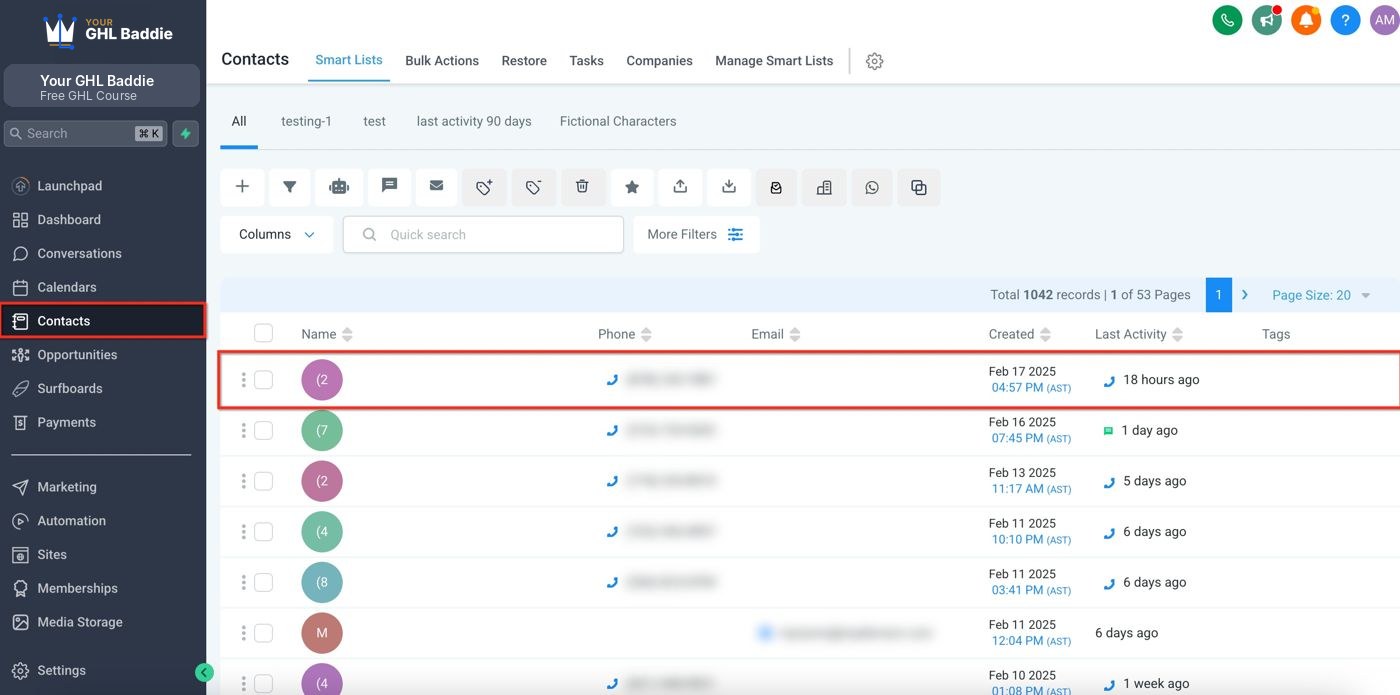
- In the contact’s left column, scroll down to the DND section.
- You can turn on DND all channels, or just one channel: Emails, Text Messages, Calls & Voicemails, or GBP (Google Business Profile messages).
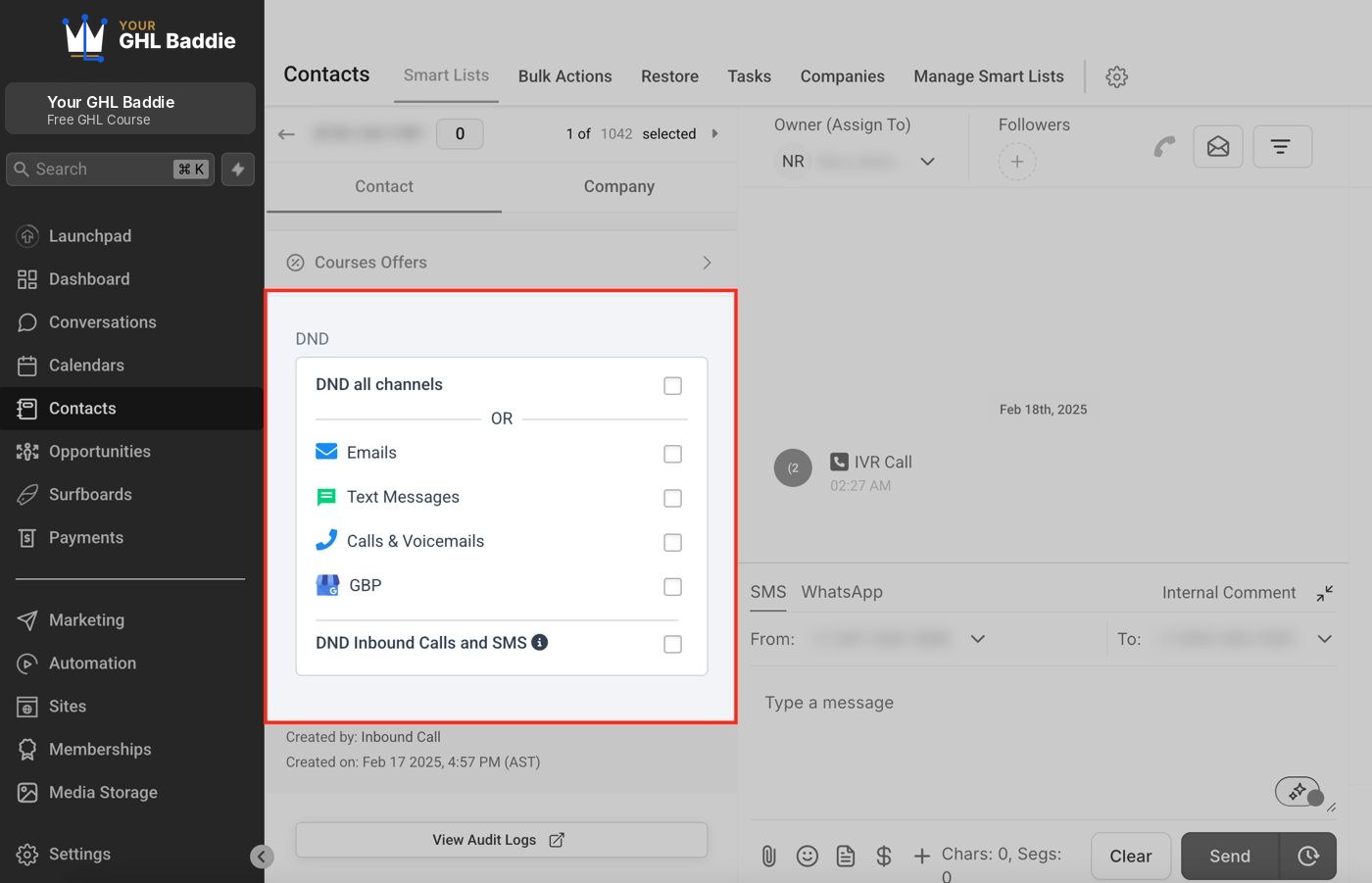
- Important: if the contact opted out themselves (by texting STOP), you can’t just switch it back on for good. The contact has to text START to opt back in. The choice is theirs, not ours.
Part D: A2P 10DLC registration (for US texting)
If your sub-account sends texts to US numbers from a regular 10-digit local number, you need to register first. According to GHL, your number must be linked to an approved A2P campaign before you can send SMS or MMS. Toll-free numbers use a different verification, and Canada has its own rules.
- Inside the sub-account, go to Settings, then Phone System, then Trust Center.
- Find the A2P Messaging (SMS) card. Click Start Registration to begin, or Brand & Campaigns to check your status.
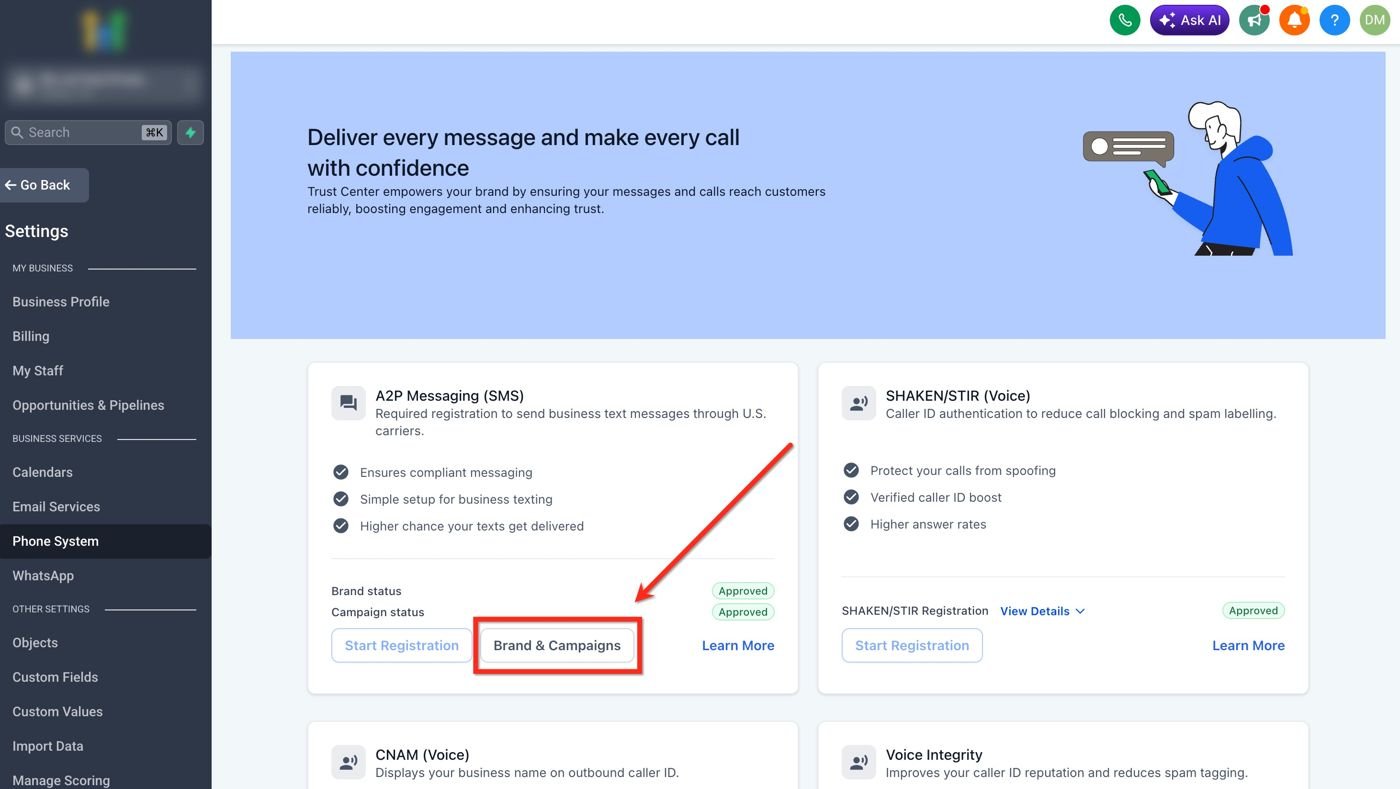
- Register your Brand (your business details). Businesses with a Tax ID or EIN register as a Standard Brand. Very small one-person businesses without one can use Sole Proprietor.
- Register your Campaign. Have these ready:
- A live website that shows your business name and contact details
- Your Privacy Policy and Terms & Conditions links
- How people opt in (for example, a form on your website)
- Sample messages that say who you are and include opt-out words like STOP
- Wait for approval from the carriers. When approved, your number shows an A2P Verified label under Settings > Phone System > Phone Numbers.
Practice task
- Open your own test contact and find the DND section. Turn on DND for Text Messages, then turn it off again.
- Write one sample text for a pretend salon that follows all the rules: business name, the message, and “Reply STOP to unsubscribe.”
- Go to Settings > Phone System > Trust Center in the practice sub-account and find the A2P Messaging (SMS) card. Don’t submit anything yet. Just look.
I did it! checklist
Bakit ito mahalaga
Let’s say you’re a real estate agent and you text 200 leads a new listing. Kung hindi sila pumayag na i-text mo, pwede kang ma-report as spam, ma-block ng carriers, at masira ang pangalan mo. Texting rules protect your clients, your phone number and your business.
Mga salitang dapat alam mo
- Consent (opt-in): kapag malinaw na pumayag ang isang tao na makatanggap ng texts mula sa’yo, like pag-tick ng box sa form mo.
- Opt-out: kapag hiniling ng isang tao na tumigil ka na sa pag-text sa kanila, kadalasan sa pag-reply ng STOP.
- DND (Do Not Disturb): setting sa isang contact sa GHL na nagba-block ng messages sa ilang channels.
- A2P 10DLC: ang US registration para sa businesses na nagte-text mula sa regular na 10-digit local phone numbers. Ang ibig sabihin ng A2P ay “application to person”.
- Brand at Campaign: ang dalawang parte ng A2P registration. Ang Brand ay kung sino ang nagse-send. Ang Campaign ay kung ano ang ipinapadala mo at bakit.
Gabay, step by step
Part A: Ang golden rules
- Permission muna. I-text lang ang mga taong pumayag makatanggap ng texts mula sa’yo, like through a form na may malinaw na consent checkbox.
- Sabihin kung sino ka. Simulan ang messages sa business name mo, para alam nila kung sino ka.
- Laging magbigay ng way out. Maglagay ng something like “Reply STOP to unsubscribe.”
- Igalang ang STOP. Kapag nag-opt out na ang isang tao, tigilan mo na ang pag-text sa kanila. Period.
- Bantayan ang content mo. May list ang help center ng GHL ng forbidden message categories para sa SMS sa US at Canada. Basahin mo yun bago ka mag-text ng promos.
Part B: Ang ginagawa ng GHL kapag may nag-reply ng STOP
- Kapag nag-reply ang contact ng opt-out word like STOP o UNSUBSCRIBE, automatic na ino-on ng GHL ang DND for text messages para sa contact na yun. Hindi mo na kailangang gawin manually.
- Para sa email, automatic ding ino-on ng GHL ang email DND kapag may nag-unsubscribe, nag-mark sa’yo as spam, o permanently nag-bounce ang email.
Part C: I-check o palitan ang DND ng contact
- Sa left menu, click Contacts at buksan ang contact.
- Sa left column ng contact, mag-scroll down hanggang sa DND section.
- Pwede mong i-on ang DND all channels, o isang channel lang: Emails, Text Messages, Calls & Voicemails, o GBP (Google Business Profile messages).
- Important: kung ang contact mismo ang nag-opt out (sa pag-text ng STOP), hindi mo pwedeng basta i-on ulit for good. Kailangang mag-text ng START ang contact para mag-opt in ulit. Ang choice ay sa kanila, hindi sa atin.
Part D: A2P 10DLC registration (para sa US texting)
Kung nagse-send ng texts sa US numbers ang sub-account mo mula sa regular na 10-digit local number, kailangan mo munang mag-register. Ayon sa GHL, your number must be linked to an approved A2P campaign before you can send SMS or MMS. Iba ang verification ng toll-free numbers, at may sariling rules ang Canada.
- Sa loob ng sub-account, pumunta sa Settings, tapos Phone System, tapos Trust Center.
- Hanapin ang A2P Messaging (SMS) card. I-click ang Start Registration para magsimula, o Brand & Campaigns para i-check ang status mo.
- I-register ang Brand mo (ang business details mo). Ang businesses na may Tax ID o EIN ay nagre-register as Standard Brand. Ang napakaliit na one-person businesses na wala nito ay pwedeng gumamit ng Sole Proprietor.
- I-register ang Campaign mo. Ihanda mo ito:
- Live website na nagpapakita ng business name at contact details mo
- Ang links ng Privacy Policy at Terms & Conditions mo
- Kung paano nag-o-opt in ang mga tao (for example, form sa website mo)
- Sample messages na nagsasabi kung sino ka at may opt-out words like STOP
- Hintayin ang approval ng carriers. Kapag approved na, may A2P Verified label na ang number mo sa Settings > Phone System > Phone Numbers.
Practice task mo
- Buksan ang sarili mong test contact at hanapin ang DND section. I-on ang DND for Text Messages, tapos i-off ulit.
- Sumulat ng isang sample text para sa pretend salon na sumusunod sa lahat ng rules: business name, ang message, at “Reply STOP to unsubscribe.”
- Pumunta sa Settings > Phone System > Trust Center sa practice sub-account at hanapin ang A2P Messaging (SMS) card. Huwag munang mag-submit ng kahit ano, look lang muna.
Checklist: Nagawa ko!
Common mistakes
- Tine-text ang leads na hindi pumayag makatanggap ng texts
- I-text lang ang mga nag-opt in, like through a form na may malinaw na consent checkbox. Kapag nag-text ka nang walang permission, pwede kang ma-report as spam at ma-block ng carriers.
- Walang paraan para mag-opt out
- Dapat sinasabi ng bawat marketing text kung sino ka at may kasamang "Reply STOP to unsubscribe."
- Sinusubukang i-off ulit ang text DND kahit nag-reply na ng STOP ang contact
- Kung ang contact mismo ang nag-opt out, sa kanila ang choice. Kailangan nilang mag-text ng START para mag-opt in ulit.
- Nagre-register sa A2P kahit mahina ang website
- Ihanda muna ang website mo: business name, contact info, Privacy Policy, Terms page at form na may malinaw na texting consent checkbox.
- Texting leads who never agreed to get texts
- Only text people who opted in, like through a form with a clear consent checkbox. Texting without permission can get you reported as spam and blocked by carriers.
- Leaving out the way to opt out
- Every marketing text should say who you are and include something like "Reply STOP to unsubscribe."
- Trying to switch text DND back off after a contact replied STOP
- If the contact opted out themselves, the choice is theirs. They have to text START to opt back in.
- Registering for A2P with a weak website
- Get your website ready first: business name, contact info, Privacy Policy, Terms page and a form with a clear texting consent checkbox.
Want to follow along in a real account? You need GHL access — get a free 30-day trial + free live training (affiliate link). Gusto mo bang sumabay sa totoong account? Kailangan mo ng GHL access — kumuha ng libreng 30-day trial + libreng live training (affiliate link).
Knowledge check
5 quick questions. You'll see why each answer is right or wrong as you go, and you can retake it as often as you like.