Module 5 · Lesson 2 of 6
Workflow Triggers Mga Workflow Trigger
Awaiting hands-on verification. The concepts here are sound, but the click-by-click steps have not yet been re-walked in a live GoHighLevel sub-account. GoHighLevel changes often, so a menu name or screen may differ from what you see. Flagged rather than presented as verified.
Before this: How Workflows Actually Work
Your knowledge-check score on How Workflows Actually Work was under 60%. Worth a quick re-read before this one — it builds on it.
On this page

In this lesson
Workflow Triggers
Sa lesson na ’to
Mga Workflow Trigger

Read the transcript
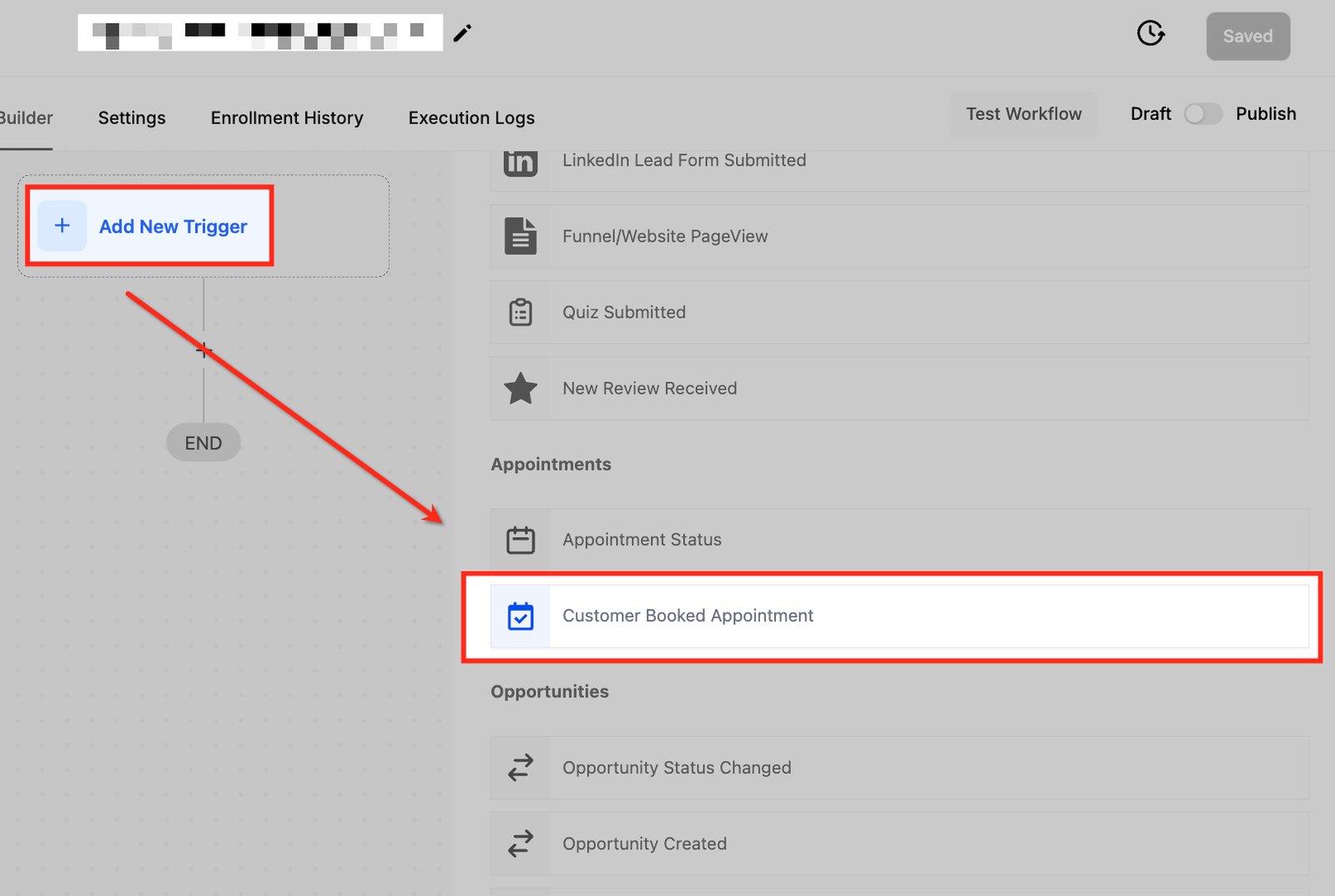
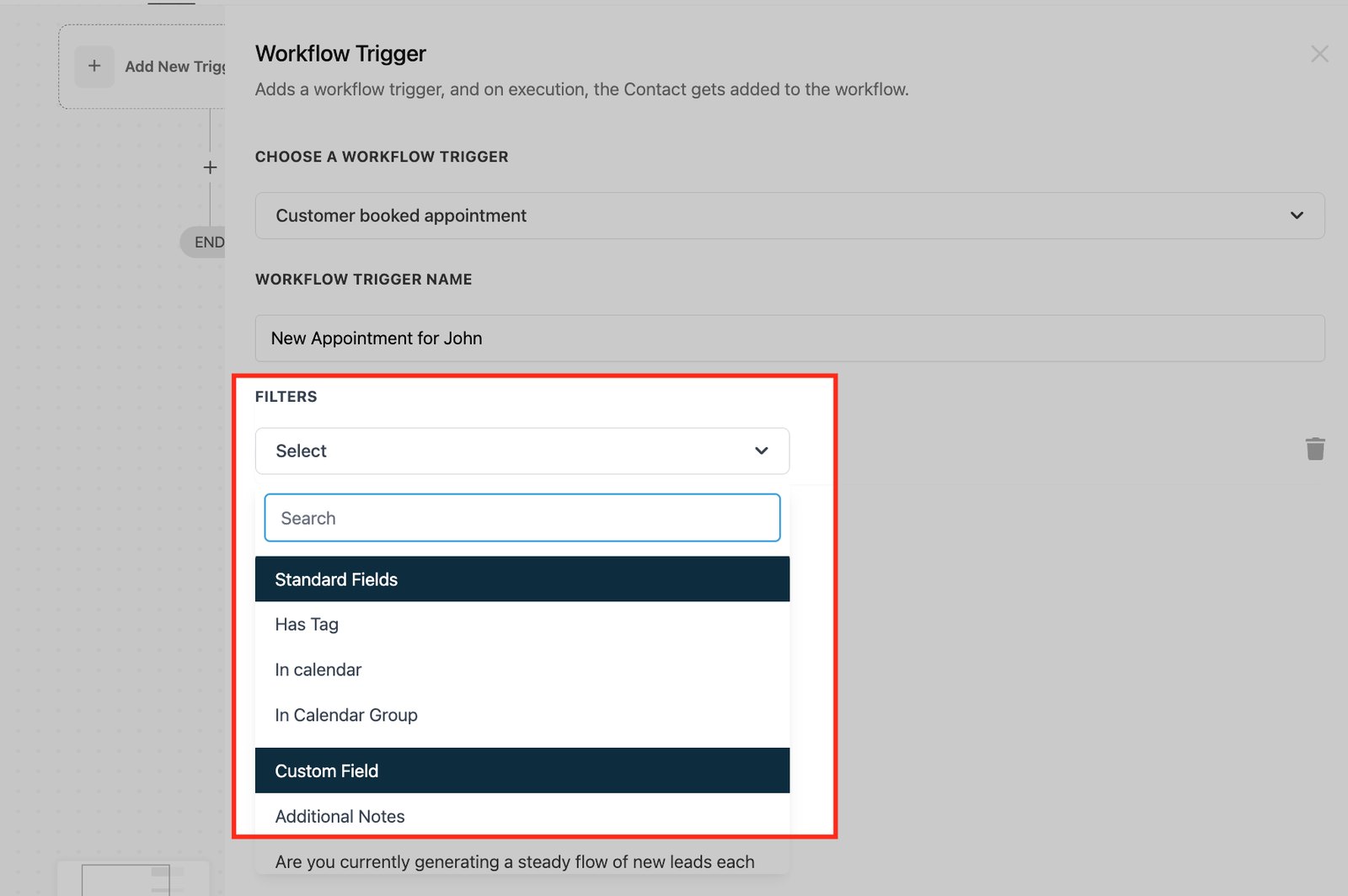
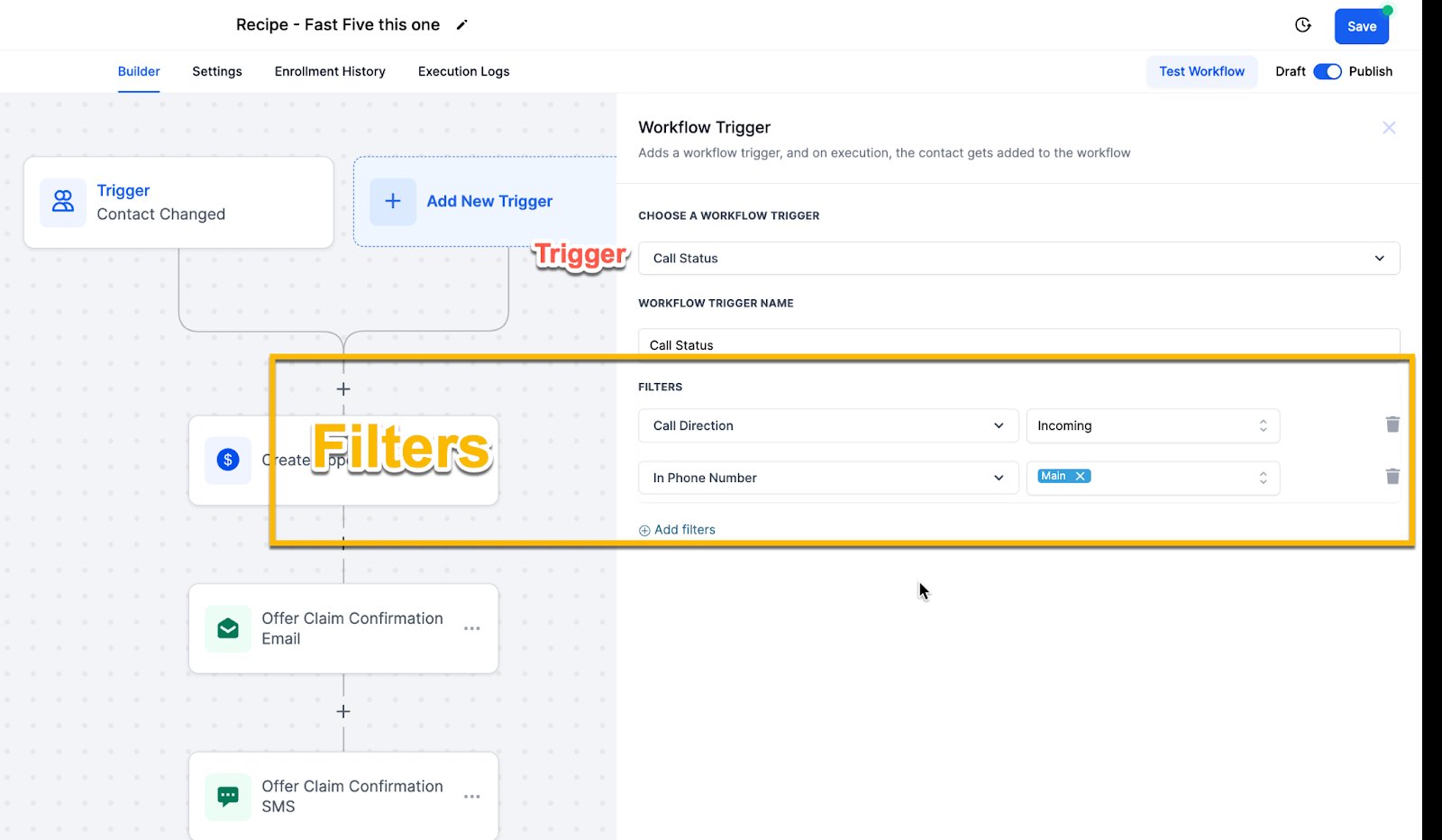
Hi baddie! I'm Hazel. The trigger decides when a workflow starts. Pick it carefully. Click Add New Trigger and pick the one that matches the real event. Someone booked a call? That's Customer Booked Appointment. Then add filters, like Has Tag or In calendar. Without a filter, the trigger fires for every calendar or every form in the account. Filters narrow who gets in. Here, only incoming calls to the main number. Watch out for Contact Created. It fires on imports too, so use the specific event instead. Most broken workflows are really trigger problems. Match the trigger to what happened. Read the lesson below, then try the practice.
Hi baddie! Si Hazel 'to. Ang trigger ang nagde-decide kung kailan magsisimula ang workflow. Piliin nang maingat. I-click ang Add New Trigger at piliin ang tugma sa totoong nangyari. May nag-book ng call? Customer Booked Appointment 'yan. Tapos mag-add ng filters, tulad ng Has Tag o In calendar. Kung walang filter, magfi-fire ang trigger sa bawat calendar o bawat form sa account. Ang filters ang nagsasala kung sino ang papasok. Dito, incoming calls lang sa main number. Ingat sa Contact Created. Nagfi-fire din ito sa imports, kaya gamitin ang specific na event. Karamihan ng sirang workflow ay trigger problem talaga. Itugma ang trigger sa nangyari. Basahin ang lesson sa baba, tapos subukan ang practice.
What you'll learn
- Choose the right trigger for a described business event
- Explain why "Contact Created" is usually the wrong trigger for a form
- Use trigger filters to narrow when a workflow starts
- Understand re-entry, and when a contact can go through twice
- Piliin ang tamang trigger para sa nilarawang business event
- Ipaliwanag kung bakit kadalasang maling trigger ang "Contact Created" para sa form
- Gamitin ang trigger filters para pakitirin kung kailan nagsisimula ang workflow
- Maintindihan ang re-entry, at kung kailan pwedeng dumaan nang dalawang beses ang contact
New words in this lesson
- Allow re-entry
- A workflow setting that decides whether a contact can go through the same workflow again when its trigger fires again.
- Appointment trigger
- A workflow trigger that starts when an appointment is booked or its status changes (confirmed, cancelled, no-show).
- Trigger
- The event that starts a workflow, such as a form submission or an appointment booking. Trigger filters narrow which cases count.
What a client actually asks
"Everyone who fills in our form should get followed up until they book. If someone fills it in again a month later, follow them up again."
Ang tanong ng client
"Lahat ng nag-fill in ng form namin, dapat ma-follow up hanggang mag-book sila. Kung may mag-fill in ulit pagkalipas ng isang buwan, i-follow up ulit sila."
Key concepts
The trigger decides when a workflow starts. Pick the wrong one and the workflow either never fires, or fires far more than anyone wanted. Most “my workflow is broken” problems are really trigger problems.
Match the trigger to the real event
Ask: what actually happened in the business that should start this? Then find the trigger that matches that event as precisely as possible.
| Business event | Trigger type (names vary slightly) |
|---|---|
| Someone fills in a form | Form submitted |
| Someone books an appointment | Appointment booked / appointment status |
| A deal moves to a stage | Pipeline stage changed |
| A deal is won or lost | Opportunity status changed |
| Someone is labeled for a reason | Contact tag added |
| A contact replies | Customer replied |
For the client at the top of the page, the event is “someone books a call”. The trigger is the appointment booked event, filtered to the right calendar.
The Contact Created trap
Contact Created sounds like the right trigger for a new lead. It usually isn’t. It fires whenever a contact is created by any route: form, import, manual entry, an integration.
The first time the client imports a spreadsheet of 400 old leads, a “welcome new lead” workflow on Contact Created sends 400 welcome texts. Use the trigger for the specific event — Form submitted — instead.
Trigger filters
Most triggers can be narrowed with filters: Form submitted — only the Website inquiry form, or Appointment booked — only the Consultations calendar.
Without a filter, a form trigger fires for every form in the account. Always ask: “should any form start this, or one specific form?” Almost always it’s one.
Re-entry
If the trigger fires again for a contact who has already been through the workflow, should they go through again? Workflows have a setting for this, often called allow re-entry.
- A second inquiry from the same person? Probably yes, re-enter.
- A welcome sequence? Probably not. Nobody wants to be welcomed twice.
Step-by-step build
You’ll build four workflows across Modules 5 and 6. Here are their triggers, so you can see “match the trigger to the real event” in action:
| Workflow | The real event | Trigger |
|---|---|---|
Maria-Practice Nurture-024 | Someone submits your form | Form submitted, filtered to your form |
Maria-Practice Hot Lead-024 | A lead replies | Customer replied, filtered to your leads |
Maria-Practice Booked Call-024 | Someone books with you | Appointment booked, filtered to your calendar |
Maria-Practice No Show-024 | An appointment is marked no-show | Appointment status, filtered to no-show on your calendar |
Today you set up the first one’s trigger. (Actions come in the next lesson.)
Write the event in plain words: “someone submits Maria-Practice form-024”.
Open Automation → Workflows → your folder (
Maria-Practice workflow-024) and create a new workflow from scratch inside it. Name itMaria-Practice Nurture-024.Add the trigger Form submitted, and add a filter: form is
Maria-Practice form-024.Turn on re-entry in the workflow’s settings. A lead who fills in the form again should be followed up again.
Save as a draft. Don’t publish until the actions are in and tested.
Check what you chose
Say the trigger back as a sentence: “This starts when someone submits my practice form, only my form, and it can run again if they submit again.” If the sentence matches what the client asked for, the trigger is right.
Mga pangunahing konsepto
Ang trigger ang nagdedesisyon kung kailan nagsisimula ang workflow. Kapag mali ang napili mo, either hindi kailanman magfa-fire ang workflow, o magfa-fire ito nang sobra-sobra sa gusto ng kahit sino. Karamihan ng “sira ang workflow ko” na problema ay trigger problem pala.
Itugma ang trigger sa totoong event
Itanong: ano ba talaga ang nangyari sa business na dapat magsimula nito? Tapos hanapin ang trigger na pinaka-eksaktong tugma sa event na ‘yon.
| Business event | Trigger type (bahagyang nag-iiba ang pangalan) |
|---|---|
| May nagpuno ng form | Form submitted |
| May nag-book ng appointment | Appointment booked / appointment status |
| Lumipat ang deal sa isang stage | Pipeline stage changed |
| Na-won o na-lost ang deal | Opportunity status changed |
| May nilagyan ng label para sa isang dahilan | Contact tag added |
| Sumagot ang contact | Customer replied |
Para sa client sa itaas, ang event ay “may nag-book ng call”. Ang trigger ay ang appointment booked event, naka-filter sa tamang calendar.
Ang bitag ng Contact Created
Parang tamang trigger ang Contact Created para sa bagong lead. Kadalasan hindi. Nagfa-fire ito tuwing may contact na nagagawa sa kahit anong paraan: form, import, manual entry, integration.
Sa unang beses na mag-import ang client ng spreadsheet ng 400 lumang leads, ang “welcome new lead” workflow na naka-Contact Created ay magpapadala ng 400 welcome texts. Gamitin na lang ang trigger para sa specific na event — Form submitted.
Mga trigger filter
Karamihan ng triggers ay pwedeng pakitirin gamit ang filters: Form submitted — ang Website inquiry form lang, o Appointment booked — ang Consultations calendar lang.
Kapag walang filter, magfa-fire ang form trigger para sa bawat form sa account. Laging itanong: “dapat bang kahit anong form ang magsimula nito, o isang specific na form?” Halos palaging isa lang.
Pagpasok ulit (re-entry)
Kung mag-fire ulit ang trigger para sa contact na nakadaan na sa workflow, dapat ba silang dumaan ulit? May setting ang workflows para dito, madalas tinatawag na allow re-entry.
- Pangalawang inquiry mula sa parehong tao? Malamang oo, papasok ulit.
- Welcome sequence? Malamang hindi. Walang gustong ma-welcome nang dalawang beses.
Pag-build, step by step
Apat na workflow ang ibu-build mo sa Modules 5 at 6. Ito ang triggers nila, para makita mo ang “itugma ang trigger sa totoong event” na gumagana:
| Workflow | Ang totoong event | Trigger |
|---|---|---|
Maria-Practice Nurture-024 | May nag-submit ng form mo | Form submitted, naka-filter sa form mo |
Maria-Practice Hot Lead-024 | Nag-reply ang lead | Customer replied, naka-filter sa leads mo |
Maria-Practice Booked Call-024 | May nag-book sa’yo | Appointment booked, naka-filter sa calendar mo |
Maria-Practice No Show-024 | Na-mark na no-show ang appointment | Appointment status, naka-filter sa no-show sa calendar mo |
Ngayon, ise-set up mo ang trigger ng una. (Sa susunod na lesson ang actions.)
Isulat ang event sa simpleng salita: “may nag-submit ng Maria-Practice form-024”.
Buksan ang Automation → Workflows → ang folder mo (
Maria-Practice workflow-024) at gumawa ng bagong workflow mula sa scratch sa loob nito. Pangalanan itongMaria-Practice Nurture-024.Idagdag ang trigger na Form submitted, at magdagdag ng filter: form is
Maria-Practice form-024.I-on ang re-entry sa settings ng workflow. Ang lead na nag-fill in ulit ng form ay dapat ma-follow up ulit.
I-save bilang draft. Huwag i-publish hangga’t wala pa at hindi pa nate-test ang actions.
I-check ang pinili mo
Sabihin ulit ang trigger bilang pangungusap: “Nagsisimula ito kapag may nag-submit ng practice form ko, form ko lang, at pwede itong tumakbo ulit kapag nag-submit ulit sila.” Kung tugma ang pangungusap sa hiningi ng client, tama ang trigger.
Common mistakes
- Gumagamit ng "Contact Created" kahit "Form Submitted" ang ibig sabihin
- Nagfa-fire din ang Contact Created sa imports at manual entry. Sa unang beses na mag-upload ang client ng 400 lumang leads, 400 beses magfa-fire ang workflow.
- Trigger na walang filter kahit ilang kaso lang ang mahalaga
- Kung isang form o isang calendar lang dapat ang magsisimula ng workflow, magdagdag ng trigger filter. Kung hindi, mapapa-start ito ng bawat form sa account.
- Dalawang trigger na parehong nagfa-fire sa iisang event
- Kung may form trigger AT tag trigger ang workflow, at idinadagdag ng form ang tag na 'yon, baka dalawang beses ma-enroll ang contact. Piliin ang iisang event na talagang mahalaga.
- Hindi iniisip ang re-entry
- Magdesisyon kung dapat bang dumaan ulit ang parehong contact kapag nag-fire ulit ang trigger. Malamang oo para sa pangalawang inquiry; malamang hindi para sa welcome sequence.
- Using "Contact Created" when you mean "Form Submitted"
- Contact Created also fires on imports and manual entry. The first time the client uploads 400 old leads, the workflow fires 400 times.
- A trigger with no filter when only some cases matter
- If only one form or one calendar should start the workflow, add a trigger filter. Otherwise every form in the account sets it off.
- Two triggers that both fire for the same event
- If a workflow has a form trigger AND a tag trigger, and the form adds that tag, the contact may enroll twice. Pick the one event that really matters.
- Not thinking about re-entry
- Decide whether the same contact should go through again if the trigger fires again. A second inquiry probably should; a welcome sequence probably shouldn't.
Want to follow along in a real account? You need GHL access — get a free 30-day trial + free live training (affiliate link). Gusto mo bang sumabay sa totoong account? Kailangan mo ng GHL access — kumuha ng libreng 30-day trial + libreng live training (affiliate link).
Knowledge check
5 quick questions. You'll see why each answer is right or wrong as you go, and you can retake it as often as you like.