Module 5 · Lesson 1 of 6
How Workflows Actually Work Paano Talaga Gumagana ang Workflows
Awaiting hands-on verification. The concepts here are sound, but the click-by-click steps have not yet been re-walked in a live GoHighLevel sub-account. GoHighLevel changes often, so a menu name or screen may differ from what you see. Flagged rather than presented as verified.
Before this: Designing a Pipeline That Matches a Real Sales Process
Your knowledge-check score on Designing a Pipeline That Matches a Real Sales Process was under 60%. Worth a quick re-read before this one — it builds on it.
On this page

In this lesson
How Workflows Actually Work
Sa lesson na ’to
Paano Talaga Gumagana ang Workflows

Read the transcript
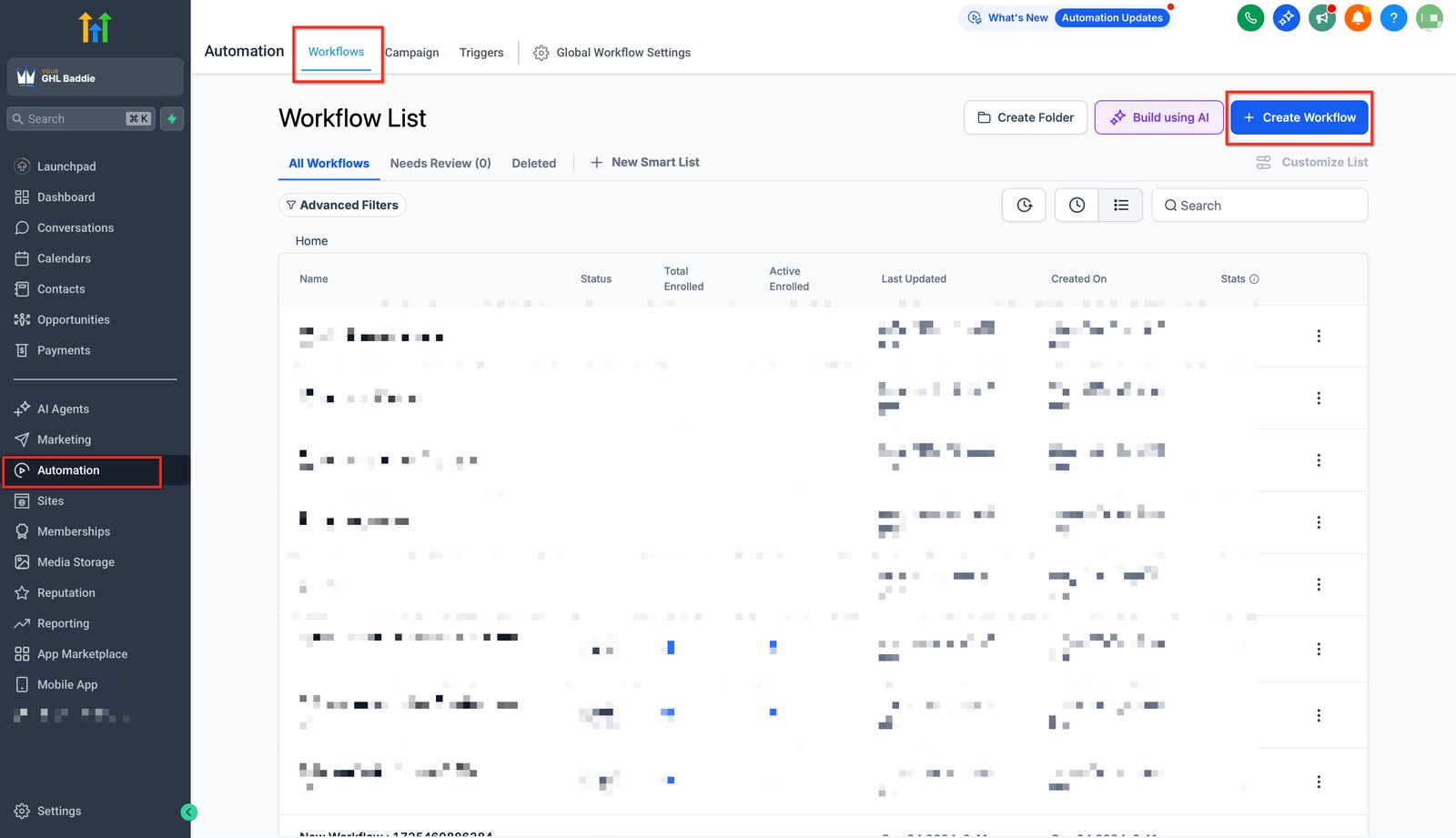
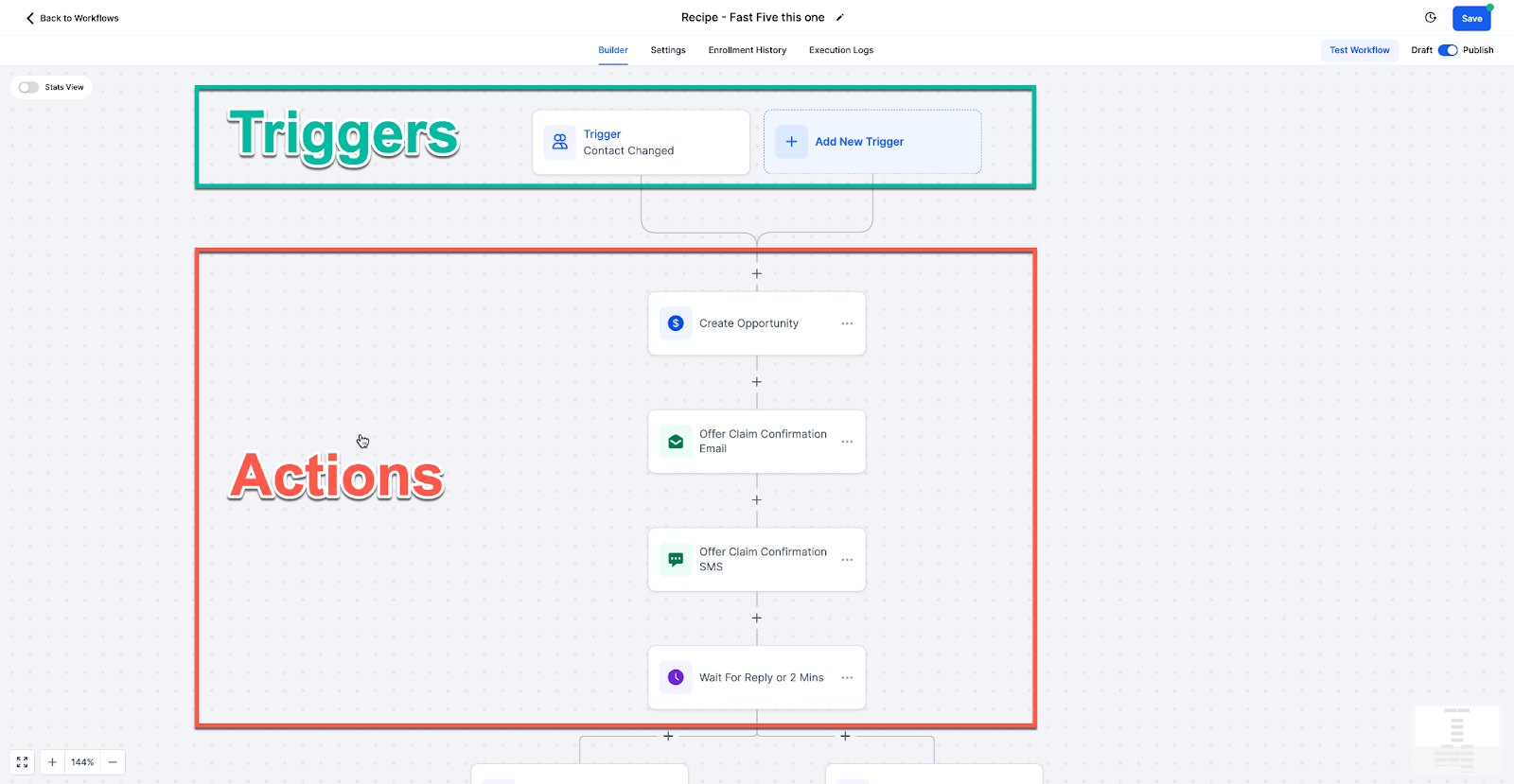
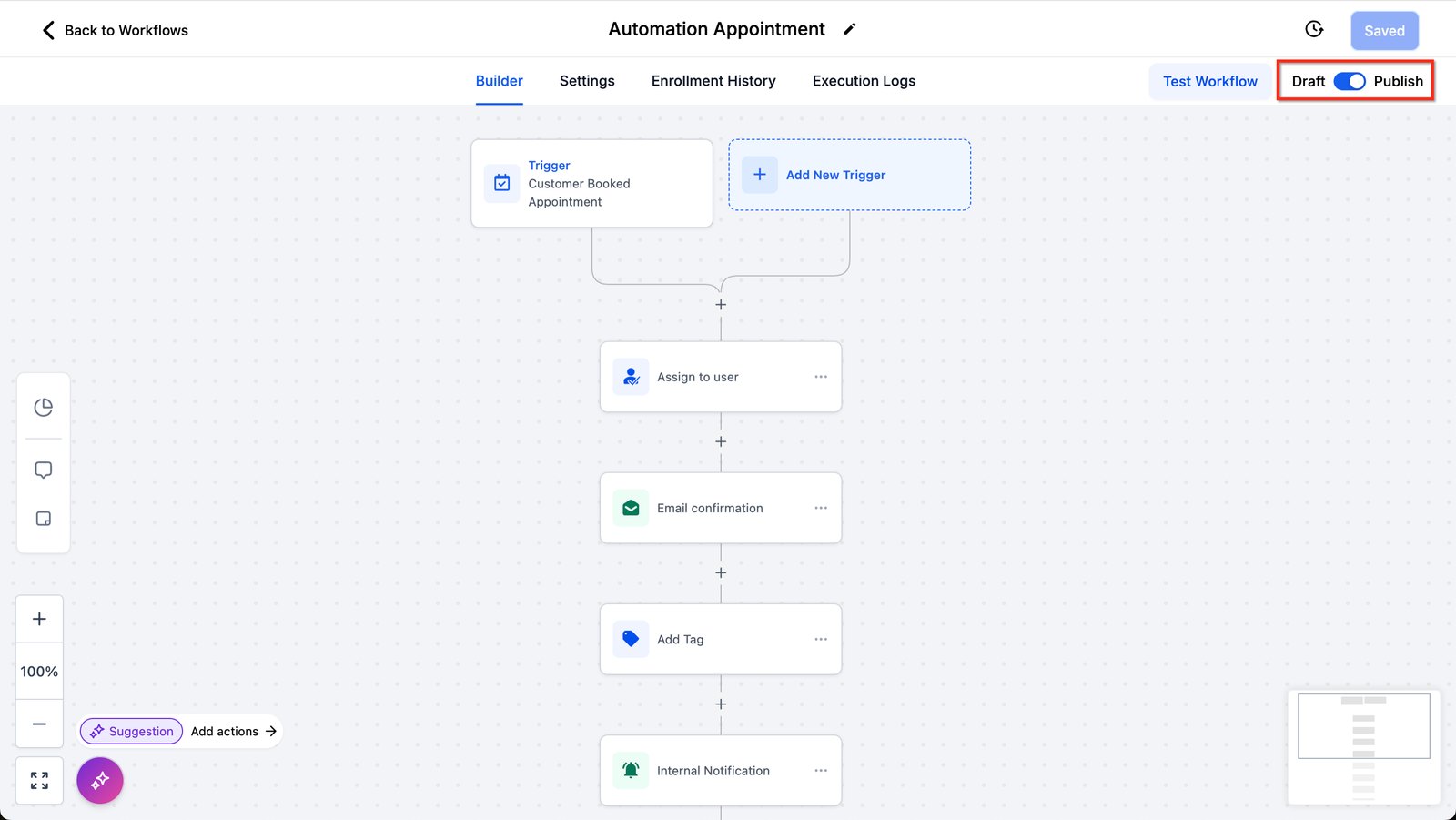
Hi baddie! I'm Hazel. Every workflow is the same: something happens, then the workflow does things. Workflows live in Automation. This is the Workflow List. Click Create Workflow to start. Give each workflow one job and a clear name. The trigger at the top starts it. The actions below run in order. When the trigger fires, the contact is enrolled and walks down the actions one by one. A saved workflow is a draft until you switch it to Publish. Drafts don't run. If nothing happens in your test, check this toggle first. Translate every request into trigger, filter and actions before you click anything. Read the lesson below, then take the quick check.
Hi baddie! Si Hazel 'to. Pare-pareho ang bawat workflow: may nangyari, tapos may gagawin ang workflow. Nasa Automation ang workflows. Ito ang Workflow List. I-click ang Create Workflow para mag-start. Isang trabaho lang bawat workflow, at malinaw ang name. Ang trigger sa taas ang nagsisimula. Ang actions sa baba, tumatakbo in order. Pag nag-fire ang trigger, na-e-enroll ang contact at isa-isang dadaan sa actions. Draft pa ang naka-save na workflow hangga't hindi mo nilalagay sa Publish. Hindi tumatakbo ang drafts. Kung walang nangyari sa test mo, i-check muna ang toggle na 'to. Gawing trigger, filter at actions ang bawat request bago ka mag-click ng kahit ano. Basahin ang lesson sa baba, tapos sagutan ang quick check.
What you'll learn
- Describe any automation as trigger → (filter) → actions
- Explain what "enrolling" a contact in a workflow means
- Know the difference between a draft and a published workflow
- Translate a client request into the three parts before building
- Ilarawan ang kahit anong automation bilang trigger → (filter) → actions
- Ipaliwanag kung ano ang ibig sabihin ng pag-"enroll" ng contact sa workflow
- Malaman ang pagkakaiba ng draft at published na workflow
- Hatiin ang request ng client sa tatlong parte bago mag-build
New words in this lesson
- Enrollment
- When a contact enters a workflow because its trigger fired. The enrollment history shows who entered and which steps ran.
- Workflow
- An automation: a trigger, optional filters, then actions. Nothing runs until the workflow is published.
What a client actually asks
"Every time someone fills in our form, I copy their details into a spreadsheet, text them, and tell Jun. Can the system just do that?"
Ang tanong ng client
"Tuwing may nagpupuno ng form namin, kinokopya ko ang details nila sa spreadsheet, tine-text sila, at sinasabihan si Jun. Kaya na ba 'yan ng system?"
Key concepts
Every workflow in GoHighLevel, from the simplest to the most complicated, is the same three things in a row:
Something happens (trigger) → only if… (filter, optional) → do these things (actions)
That’s the whole model. The rest of this module is learning each part properly.
Translate the request first
Take the client at the top of the page. Underneath the frustration, they’ve described a workflow exactly:
| Part | In the client’s words | In GHL terms |
|---|---|---|
| Trigger | “every time someone fills in our form” | Form submitted (the inquiry form) |
| Filter | (none — every submission) | — |
| Actions | “copy their details into a spreadsheet” | Already done — the form fills the contact record |
| “text them” | Send SMS to the contact | |
| “tell Jun” | Internal notification to Jun |
Notice the spreadsheet step disappeared. Because the form writes to the contact record (Lesson 8), the “copying” is already done. Spotting work the system already does for free is part of the job, and clients love hearing it.
Enrollment
When a trigger fires for a contact, that contact is enrolled in the workflow. They then move through the actions one by one, like a person walking down a corridor. Several contacts can be at different points in the same workflow at the same time.
That’s why wait steps (Lesson 16) work. One contact can be waiting three days in the middle of the corridor while a brand-new one starts at the beginning.
Draft vs published
A workflow you’ve built and saved is a draft until you publish it. Drafts don’t run. This catches nearly everyone once: you build something, test it, nothing happens, and the reason is that it was never switched on.
One job per workflow
It’s tempting to build one giant “Everything” workflow. Don’t. Separate jobs — new-lead follow-up, appointment reminders, review requests — belong in separate workflows with clear names. They’re easier to test, easier to fix, and much easier to hand over.
Practice the translation
No clicking yet. Translate these three requests into trigger / filter / actions on paper:
- “When someone books a consultation, send them a confirmation and let Maricel know."
- "If a lead from the Cebu branch fills in the form, add them to the Cebu pipeline."
- "When a deal is marked won, send a thank-you email and tag them as a customer.”
The second one has a filter (Cebu branch only). The other two don’t. Once you can split requests like this without thinking, the builder becomes the easy part.
Mga pangunahing konsepto
Bawat workflow sa GoHighLevel, mula sa pinakasimple hanggang sa pinakakumplikado, ay iisang tatlong bagay na magkakasunod:
May nangyari (trigger) → kung… lang (filter, optional) → gawin ang mga ito (actions)
‘Yan na ang buong model. Ang natitira sa module na ‘to ay pag-aaral nang maayos sa bawat parte.
Isalin muna ang request
Kunin ang client sa itaas ng page. Sa ilalim ng frustration, eksaktong workflow ang nilarawan nila:
| Parte | Sa salita ng client | Sa GHL terms |
|---|---|---|
| Trigger | “tuwing may nagpupuno ng form namin” | Form submitted (ang inquiry form) |
| Filter | (wala — bawat submission) | — |
| Actions | “kinokopya ko ang details nila sa spreadsheet” | Tapos na — pinupunan ng form ang contact record |
| “tine-text sila” | Send SMS sa contact | |
| “sinasabihan si Jun” | Internal notification kay Jun |
Pansinin na nawala ang spreadsheet step. Dahil sumusulat ang form sa contact record (Lesson 8), tapos na ang “pagkopya”. Parte ng trabaho ang makita ang ginagawa na ng system nang libre, at gustong-gusto ‘yan marinig ng clients.
Pag-enroll
Kapag nag-fire ang trigger para sa isang contact, na-enroll ang contact na ‘yon sa workflow. Dadaan sila sa actions isa-isa, parang taong naglalakad sa pasilyo. Pwedeng nasa magkakaibang punto ng iisang workflow ang ilang contacts nang sabay.
Kaya gumagana ang wait steps (Lesson 16). Pwedeng naghihintay ng tatlong araw ang isang contact sa gitna ng pasilyo habang nagsisimula pa lang ang bagong-bago.
Draft o published?
Ang workflow na ginawa at sinave mo ay draft hangga’t hindi mo pina-publish. Hindi tumatakbo ang drafts. Halos lahat ay nahuhuli nito minsan: may ginawa ka, tinest mo, walang nangyari, at ang dahilan ay hindi pala ito kailanman na-on.
Isang trabaho bawat workflow
Nakakatuksong gumawa ng iisang higanteng “Everything” workflow. Huwag. Ang magkakahiwalay na trabaho — new-lead follow-up, appointment reminders, review requests — ay dapat nasa magkakahiwalay na workflows na malinaw ang pangalan. Mas madali silang i-test, mas madaling ayusin, at mas madaling i-handover.
Praktisin ang pagsalin
Wala munang pindutan. Isalin sa papel ang tatlong request na ‘to bilang trigger / filter / actions:
- “Kapag may nag-book ng consultation, padalhan sila ng confirmation at sabihan si Maricel."
- "Kung nagpuno ng form ang lead mula sa Cebu branch, idagdag sila sa Cebu pipeline."
- "Kapag na-mark as won ang deal, magpadala ng thank-you email at i-tag sila bilang customer.”
May filter ang pangalawa (Cebu branch lang). Wala ang dalawa pa. Kapag kaya mo nang hatiin ang requests nang ganito nang hindi nag-iisip, ang builder na ang madaling parte.
Common mistakes
- Binubuksan ang workflow builder bago malaman ang tatlong parte
- Isulat muna sa simpleng salita ang trigger, mga filter, at ang actions. Mas madali ang builder kapag alam mo na ang ibu-build mo.
- Akala tumatakbo na ang naka-save na workflow
- Walang ginagawa ang workflow hangga't hindi naka-publish. Ang draft ay naka-off.
- Isang napakalaking workflow na gumagawa ng lahat
- Ang magkakahiwalay na trabaho (new-lead follow-up, appointment reminders, review requests) ay dapat nasa magkakahiwalay at malinaw ang pangalang workflows. Mas madali silang i-test at i-handover.
- Opening the workflow builder before you know the three parts
- Write the trigger, any filters, and the actions in plain words first. The builder is much easier when you already know what you're building.
- Thinking a saved workflow is running
- A workflow does nothing until it's published. Draft means off.
- One enormous workflow that does everything
- Separate jobs (new-lead follow-up, appointment reminders, review requests) belong in separate, clearly named workflows. They're easier to test and to hand over.
Knowledge check
5 quick questions. You'll see why each answer is right or wrong as you go, and you can retake it as often as you like.