Module 2 · Lesson 1 of 4
The Contact Record: GHL's Center of Gravity Ang Contact Record: Sentro ng Lahat sa GHL
Awaiting hands-on verification. The concepts here are sound, but the click-by-click steps have not yet been re-walked in a live GoHighLevel sub-account. GoHighLevel changes often, so a menu name or screen may differ from what you see. Flagged rather than presented as verified.
Before this: Your Practice Access and Navigating a Sub-Account
Your knowledge-check score on Your Practice Access and Navigating a Sub-Account was under 60%. Worth a quick re-read before this one — it builds on it.
On this page

In this lesson
The Contact Record: GHL's Center of Gravity
Sa lesson na ’to
Ang Contact Record: Sentro ng Lahat sa GHL

Read the transcript
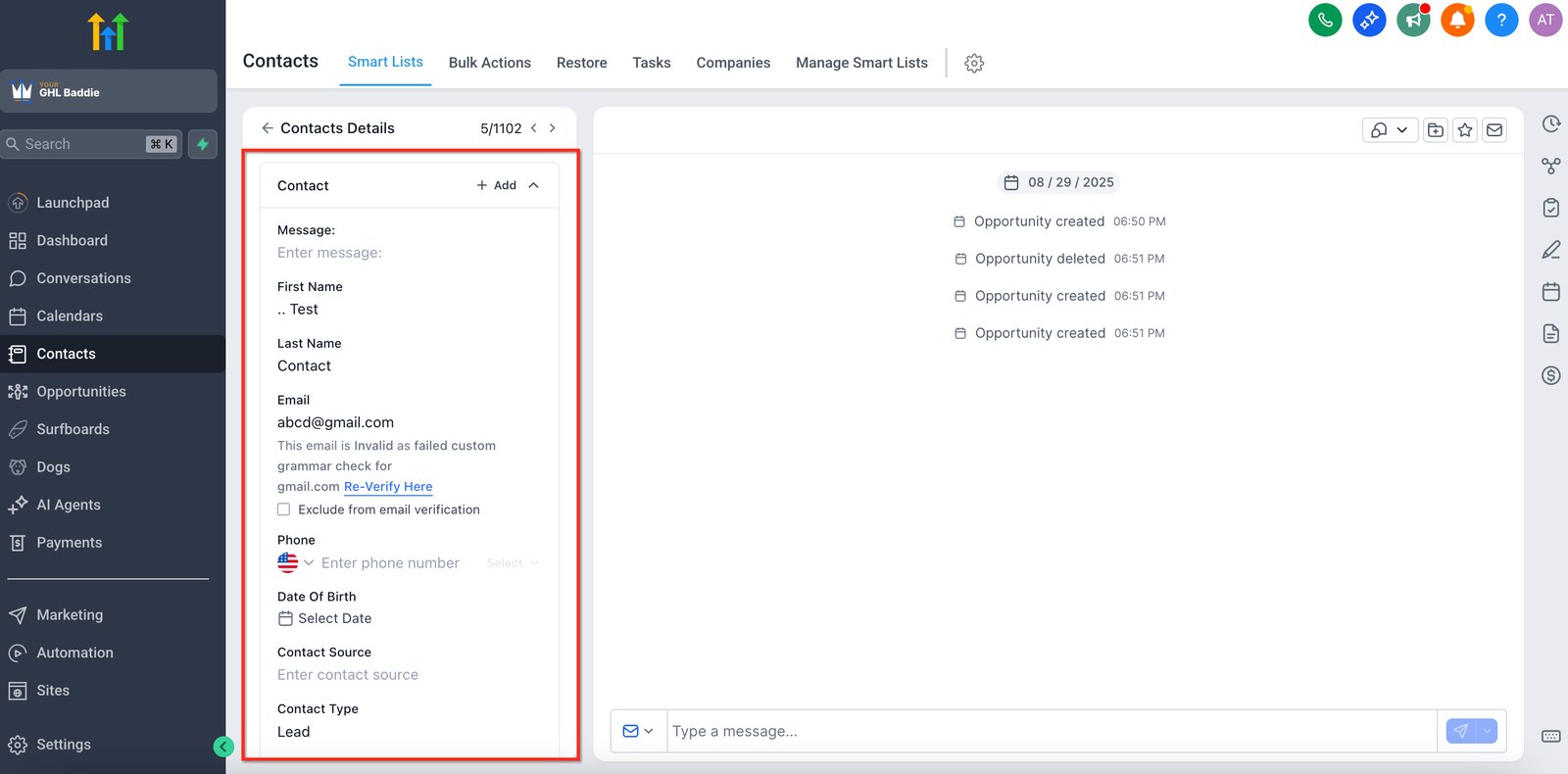
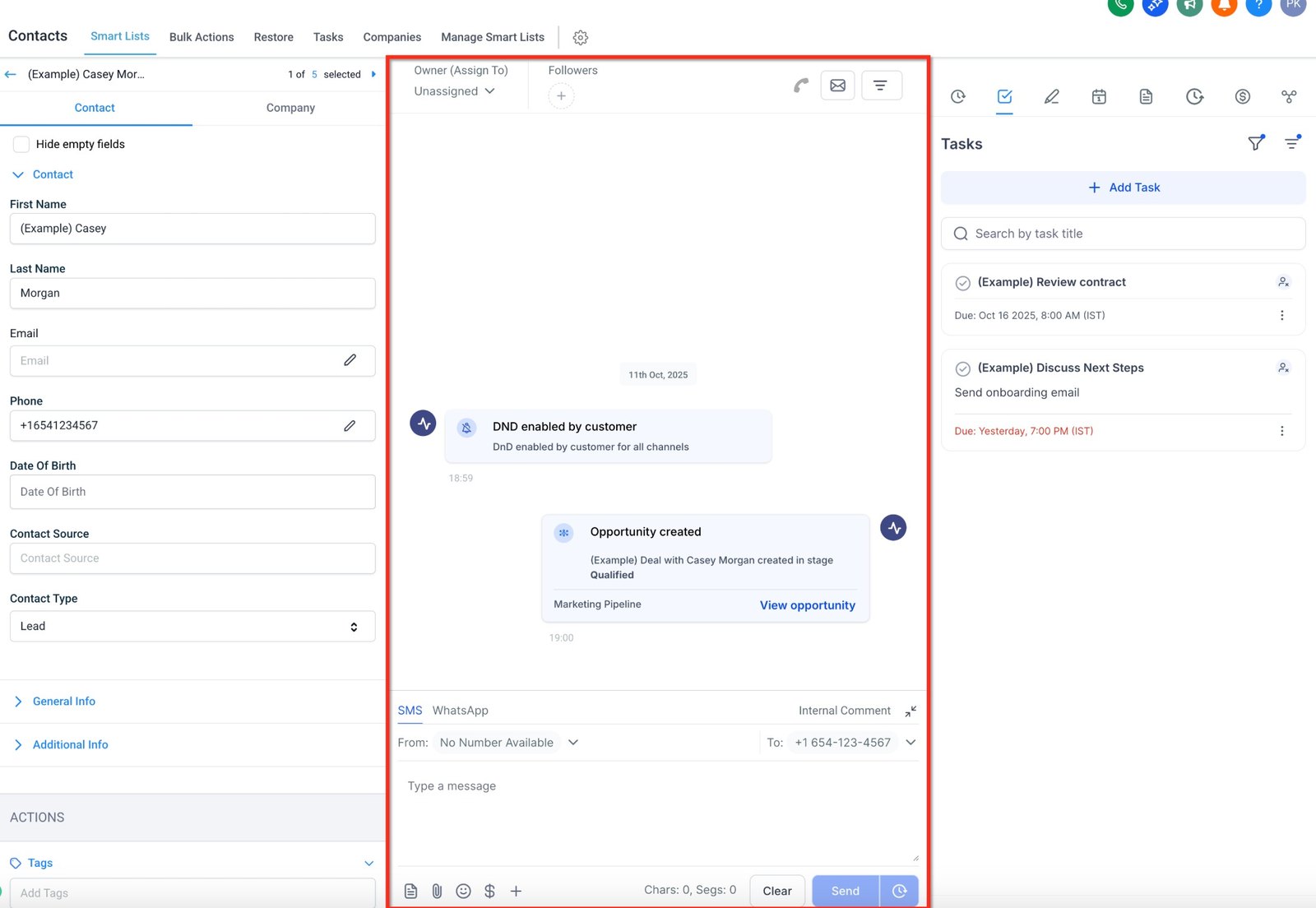
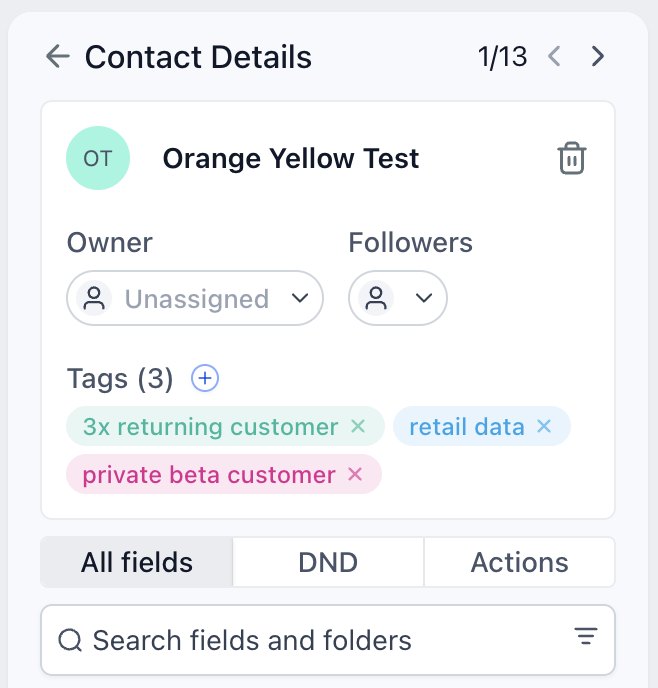
Hi baddie! I'm Hazel. In GHL, almost everything happens to a contact. Let's open one. The left panel holds the contact's fields: name, email, phone, source and type. Check these first. Is the email right? Is the phone formatted properly? In the middle is the activity: messages, deals and what happened, in order. On the right are tasks. This one screen tells the contact's whole story. Tags show how this person is grouped. Good tag names tell you what they mean without asking anyone. Who, what we know, groups, history, deals. Read every contact in that order. Read the lesson below, then take the quick check.
Hi baddie! Si Hazel 'to. Sa GHL, halos lahat nangyayari sa contact. Buksan natin ang isa. Nasa left panel ang fields ng contact: name, email, phone, source at type. I-check muna ito. Tama ba ang email? Maayos ba ang format ng phone? Nasa gitna ang activity: messages, deals at mga nangyari, in order. Nasa right ang tasks. Itong isang screen na 'to ang buong kwento ng contact. Ang tags ang nagpapakita kung paano naka-group ang taong 'to. Ang magandang tag name, alam mo agad ang ibig sabihin kahit hindi ka magtanong. Sino, ano ang alam natin, groups, history, deals. Ganyan ang order sa pagbasa ng contact. Basahin ang lesson sa baba, tapos sagutan ang quick check.
What you'll learn
- Read a contact record and know what each part is for
- Explain why almost every GHL feature reads from or writes to the contact
- Tell standard fields, custom fields, tags and activity apart
- Avoid creating duplicate contacts
- Mabasa ang contact record at malaman kung para saan ang bawat parte
- Maipaliwanag kung bakit halos lahat ng GHL feature ay bumabasa o sumusulat sa contact
- Makilala ang pagkakaiba ng standard fields, custom fields, tags at activity
- Maiwasan ang duplicate contacts
New words in this lesson
- Contact
- A person in the CRM. The center of GoHighLevel: forms, workflows, appointments, deals and messages all connect to a contact.
What a client actually asks
"When a lead calls, I want to see everything in one place — what form they filled in, what we've sent them, and whether they've booked."
Ang tanong ng client
"Kapag tumawag ang lead, gusto kong makita lahat sa iisang lugar — anong form ang pinunan nila, ano na ang naipadala namin, at kung naka-book na sila."
Key concepts
If you remember one thing from this module, make it this: in GoHighLevel, almost everything happens to a contact.
- A form creates or updates a contact.
- A workflow is triggered by something happening to a contact, then acts on it.
- An appointment is booked by a contact.
- An opportunity (a deal) is attached to a contact.
- Every message in Conversations belongs to a contact.
That’s why we call it the center of gravity. When the client at the top of the page asks to “see everything in one place”, the contact record is that place — as long as the system was built to fill it in properly.
What’s on a contact record
Open any contact and you’ll find roughly four kinds of information:
| Kind | Examples | Who fills it in |
|---|---|---|
| Standard fields | First name, last name, email, phone, address | Forms, imports, people |
| Custom fields | Service area, budget, preferred clinic branch | Forms, workflows, people — you design these |
| Tags | lead-website, customer, newsletter | Workflows and people |
| Activity | Messages, appointments, form submissions, notes, deals | The system, automatically |
The first three are data you design. The fourth is history the system records. Building in GHL mostly means designing the first three so the fourth tells a useful story.
One person, one record
GHL generally uses email and phone to recognize whether a contact already exists. If a lead fills in a form with the same email as an existing contact, the existing record is usually updated rather than duplicated.
That’s why typos matter. maria@gmail.con and maria@gmail.com are two
different people as far as the system knows, and the lead’s history ends up
split between them.
Step-by-step: read a contact like a VA
When you open a contact on a client account, read it in this order. Once you’ve made your own test contact in Lesson 8, you can practice on that one:
- Who is this? Check the standard fields. Is the email and phone formatted properly?
- What do we know? Scan the custom fields. Which are empty? Empty fields are often the reason a workflow “didn’t work”.
- How is this person grouped? Read the tags. Can you tell what each one means just from its name?
- What has happened? Scroll the activity: form submissions, messages, appointments.
- Is there a deal? Check for any opportunities attached to the contact.
Five questions, in that order. Do this every time a client asks “why didn’t X happen to this lead?” — the answer is almost always somewhere on the record.
Mga pangunahing konsepto
Kung isang bagay lang ang tatandaan mo sa module na ‘to, ito na: sa GoHighLevel, halos lahat ay nangyayari sa isang contact.
- Ang form ay gumagawa o nag-a-update ng contact.
- Ang workflow ay nati-trigger kapag may nangyari sa contact, tapos may ginagawa ito sa contact.
- Ang appointment ay bino-book ng contact.
- Ang opportunity (deal) ay naka-attach sa contact.
- Bawat message sa Conversations ay pag-aari ng isang contact.
Kaya tinatawag namin itong center of gravity. Kapag hiniling ng client sa itaas na “makita lahat sa iisang lugar”, ang contact record mismo ang lugar na ‘yon — basta’t na-build ang system para mapunan ito nang maayos.
Ano ang laman ng contact record
Buksan ang kahit anong contact at makikita mo ang halos apat na klase ng info:
| Klase | Halimbawa | Sino ang nagpupuno |
|---|---|---|
| Standard fields | First name, last name, email, phone, address | Forms, imports, mga tao |
| Custom fields | Service area, budget, gustong clinic branch | Forms, workflows, mga tao — ikaw ang nagdidisenyo nito |
| Tags | lead-website, customer, newsletter | Workflows at mga tao |
| Activity | Messages, appointments, form submissions, notes, deals | Ang system, automatic |
Ang unang tatlo ay data na dinidisenyo mo. Ang pang-apat ay history na nire-record ng system. Ang pag-build sa GHL ay halos pagdisenyo ng unang tatlo para may kwentang masabi ang pang-apat.
Isang tao, isang record
Kadalasan email at phone ang ginagamit ng GHL para malaman kung meron nang contact. Kapag nagpunan ng form ang lead gamit ang parehong email ng existing contact, kadalasan ina-update ang existing record sa halip na gumawa ng duplicate.
Kaya mahalaga ang typos. Para sa system, magkaibang tao ang maria@gmail.con at
maria@gmail.com, at nahahati sa kanila ang history ng lead.
Step by step: magbasa ng contact na parang VA
Kapag nagbukas ka ng contact sa client account, basahin ito sa ganitong pagkakasunod. Kapag nagawa mo na ang sarili mong test contact sa Lesson 8, doon ka pwedeng magpraktis:
- Sino ito? Tingnan ang standard fields. Tama ba ang format ng email at phone?
- Ano ang alam natin? Silipin ang custom fields. Alin ang walang laman? Madalas, ang empty fields ang dahilan kung bakit “hindi gumana” ang workflow.
- Paano naka-grupo ang taong ito? Basahin ang tags. Malalaman mo ba ang ibig sabihin ng bawat isa mula sa pangalan lang?
- Ano na ang nangyari? I-scroll ang activity: form submissions, messages, appointments.
- May deal ba? Tingnan kung may opportunities na naka-attach sa contact.
Limang tanong, sa ganyang order. Gawin ito tuwing magtatanong ang client ng “bakit hindi nangyari ang X sa lead na ‘to?” — halos palaging nasa record ang sagot.
Common mistakes
- Tinitingnan ang contact record na parang pangalan at phone number lang
- Sa contact nagdudugtong ang history, fields, tags, appointments at deals. Pag-isipang mabuti kung ano ang ilalagay dito, dahil dito babasa ang bawat workflow.
- Gumagawa ng bagong contact kahit meron na
- Mag-search muna gamit ang email at phone. Kadalasan sa email o phone nagma-match ng contacts ang GHL, kaya ang typo sa alinman ay pwedeng gumawa ng duplicate na maghahati sa history ng lead.
- Sa notes lang nilalagay ang importanteng info
- Para sa tao ang notes. Hindi maaasahang makapag-filter ang workflows at smart lists sa free text. Kung may desisyong nakasalalay dito, dapat nasa field o tag.
- Treating the contact record as just a name and phone number
- The contact is where history, fields, tags, appointments and deals all connect. Design what goes on it on purpose, because every workflow will read from it.
- Creating a new contact when one already exists
- Search by email and phone first. GHL generally matches contacts on email or phone, so a typo in either one can create a duplicate that splits the lead's history in two.
- Storing important information only in notes
- Notes are for humans. Workflows and smart lists can't reliably filter on free text. If something drives a decision, it belongs in a field or a tag.
Knowledge check
5 quick questions. You'll see why each answer is right or wrong as you go, and you can retake it as often as you like.