Module 2 · Lesson 3 of 4
Tags (and When Not to Use Them) Tags (at Kailan Hindi Dapat Gamitin)
Awaiting hands-on verification. The concepts here are sound, but the click-by-click steps have not yet been re-walked in a live GoHighLevel sub-account. GoHighLevel changes often, so a menu name or screen may differ from what you see. Flagged rather than presented as verified.
Before this: Custom Fields: Structuring Client Data
Your knowledge-check score on Custom Fields: Structuring Client Data was under 60%. Worth a quick re-read before this one — it builds on it.
On this page

In this lesson
Tags (and When Not to Use Them)
Sa lesson na ’to
Tags (at Kailan Hindi Dapat Gamitin)

Read the transcript
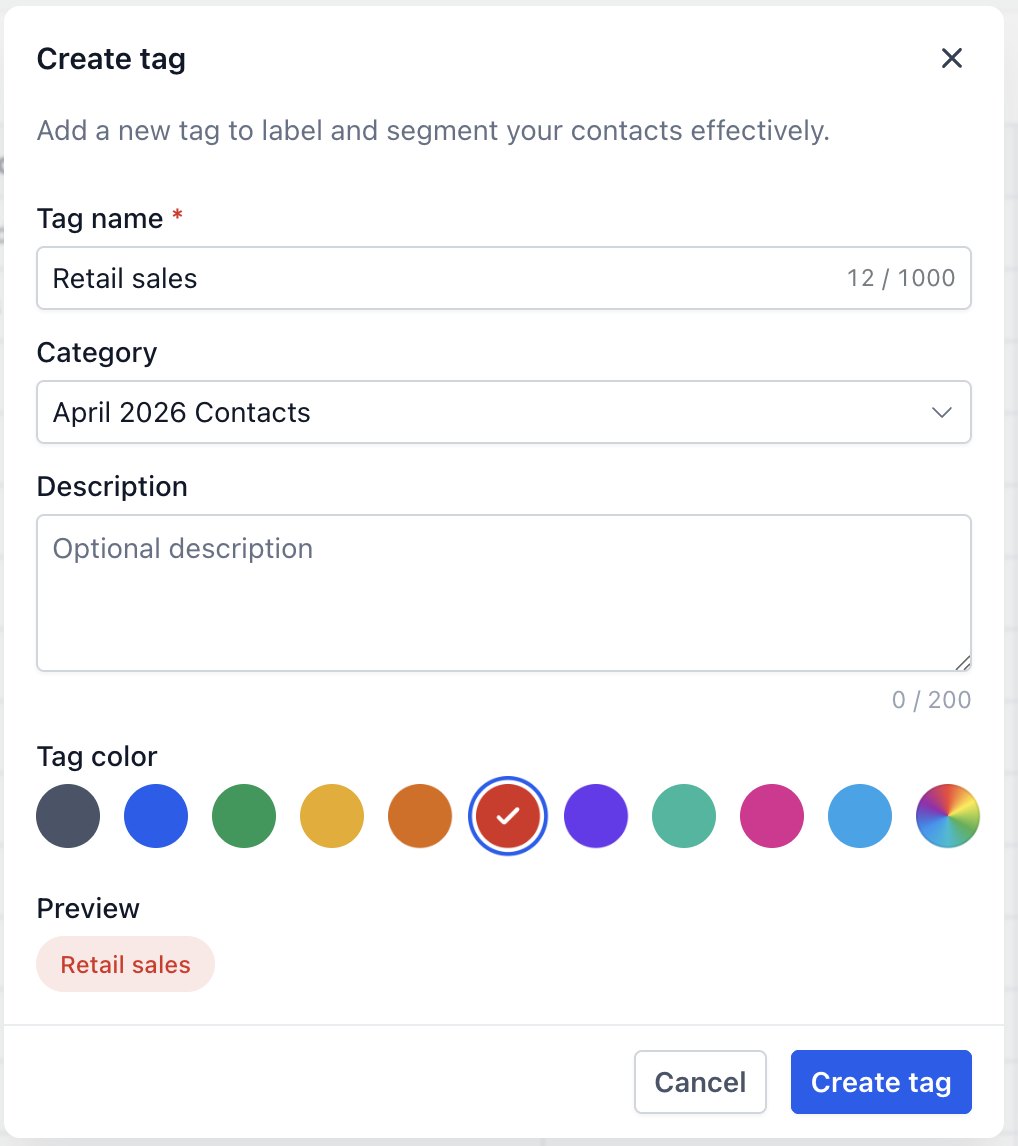
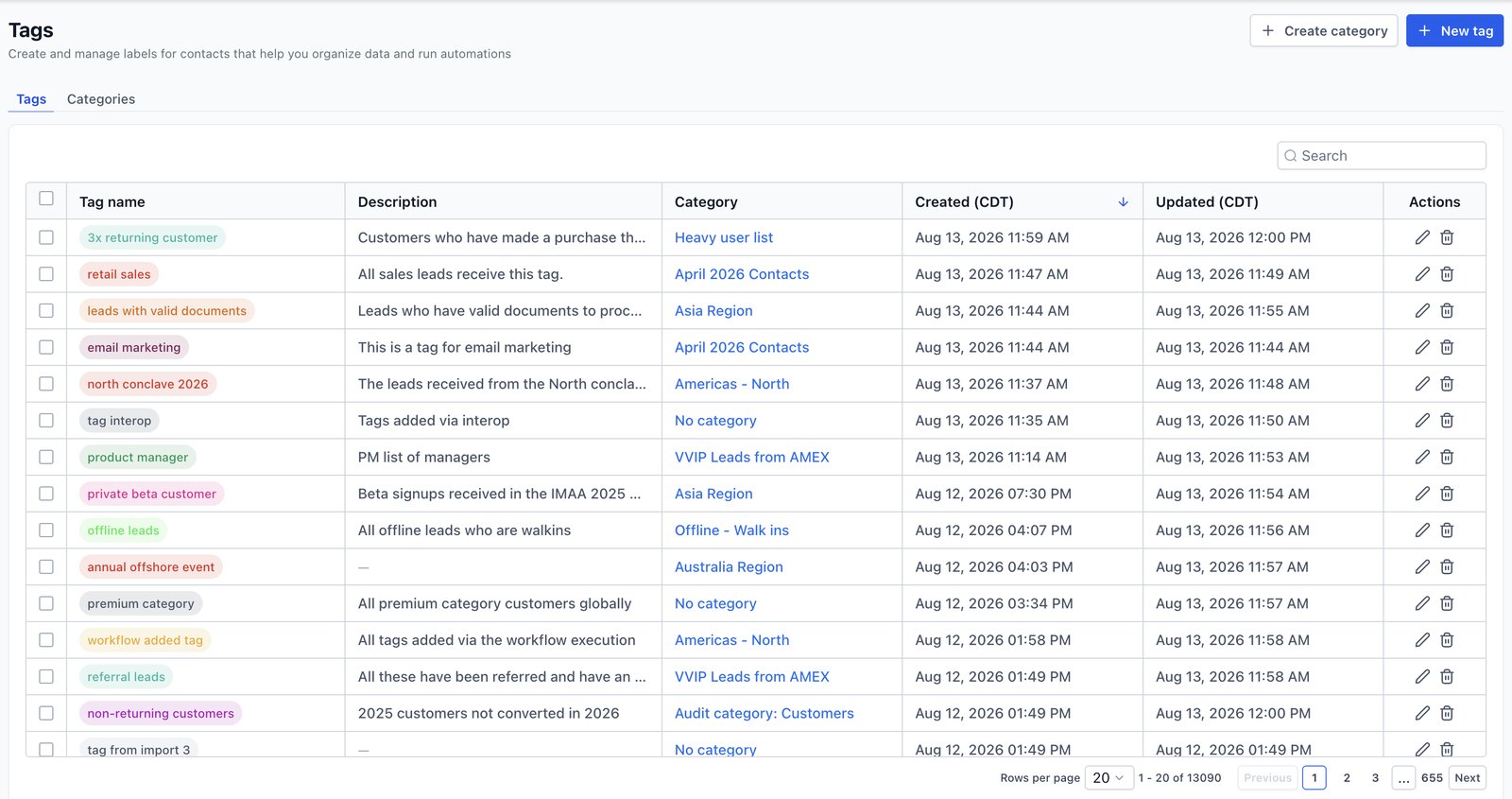
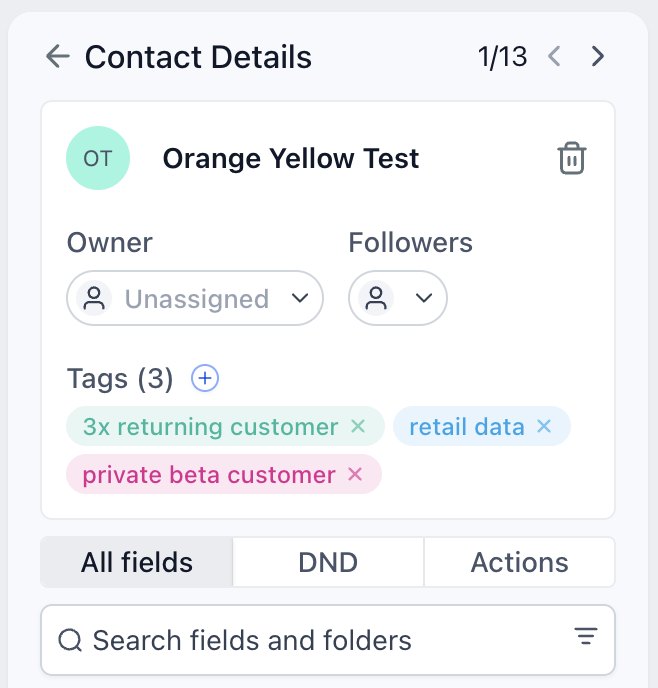
Hi baddie! I'm Hazel. Tags are easy to add, and that's why they get messy. Let's keep them clean. Creating a tag takes a name, an optional category and a color. Use one naming pattern every time, like lowercase with a prefix: src-website. This is the Tags list in Settings. Read it to spot patterns, and the mess. Before you delete a tag, check what uses it. A workflow might depend on it. On a contact, tags show up here. Click the plus to add one. Tags are for yes or no facts. Values like budget belong in a custom field. Write your tag convention down for the client. It makes you look very professional. Read the lesson below, then take the quick check.
Hi baddie! Si Hazel 'to. Madaling mag-add ng tags, kaya madali ring gumulo. Panatilihin nating malinis. Pag gagawa ng tag, kailangan ng name, optional na category at color. Iisang naming pattern lang lagi, tulad ng lowercase na may prefix: src-website. Ito ang Tags list sa Settings. Basahin mo para makita ang patterns, at ang gulo. Bago mag-delete ng tag, i-check kung ano ang gumagamit nito. Baka may workflow na umaasa dito. Sa contact, dito lumalabas ang tags. I-click ang plus para mag-add. Para sa yes or no na facts ang tags. Ang values tulad ng budget, sa custom field dapat. Isulat ang tag convention mo para sa client. Mukha kang very professional dito. Basahin ang lesson sa baba, tapos sagutan ang quick check.
What you'll learn
- Know what a tag is good for, and what it isn't
- Choose between a tag and a custom field
- Apply a simple, consistent tagging convention
- Avoid tag sprawl — the most common mess a VA inherits
- Malaman kung saan magaling ang tag, at saan hindi
- Pumili sa pagitan ng tag at custom field
- Gumamit ng simple at consistent na tagging convention
- Iwasan ang tag sprawl — ang pinakakaraniwang gulong namamana ng VA
New words in this lesson
- Tag
- A yes/no label on a contact, used to group contacts or start workflows. Values with ranges belong in custom fields instead.
What a client actually asks
"Our account has over 200 tags and nobody knows what half of them mean. Can we stop it getting worse while we figure it out?"
Ang tanong ng client
"Mahigit 200 na ang tags sa account namin at walang nakakaalam ng ibig sabihin ng kalahati nito. Pwede bang pigilan muna nating lumala habang inaayos natin?"
Key concepts
A tag is a simple label on a contact. A contact either has it or doesn’t. Tags are quick to add — by hand, by import or by workflow — and that is exactly why they get out of hand.
The client at the top of the page is describing the most common first job a GHL VA gets hired for: an account where every past VA added tags as they went, and nobody wrote down what any of them mean. This lesson is about not becoming part of that problem.
What tags are good for
Tags are great for yes/no facts and events:
- Is this person a customer? →
customer - Did they come from the website? →
src-website - Did they ask to join the newsletter? →
newsletter-optin - Should a workflow start? → adding a tag can trigger one
Tag or custom field?
This is the decision that prevents most of the mess:
| If the information is… | Use | Why |
|---|---|---|
| Yes or no | Tag | That’s exactly what a tag is |
| One of a fixed list of values | Custom field (dropdown) | One field instead of many tags |
| A number, amount or date | Custom field | Tags can’t be compared or sorted |
| Free text | Custom field | Tags aren’t for sentences |
Example of the mess: budget-10k, budget-20k, budget-50k,
Budget 50k+. That’s four tags pretending to be one field. A single
Budget (Monetary) field holds the real value and can be filtered as
“greater than 20,000”.
A naming convention that works
Pick a short pattern and use it every time. One that works well:
- lowercase, hyphenated —
src-website, neverWebsite Lead - a prefix for the kind of tag —
src-for lead source,int-for interest,status-for status,wf-for tags that only exist to control a workflow - no dates or one-off events in tag names unless a workflow actually needs them
Write the convention down for the client. A one-page tag guide is a small deliverable that makes you look very professional.
Step-by-step: apply the convention
Find the tags list, usually in Settings (and visible on any contact). Read through it and notice the patterns, and the mess.
Write your convention in a note: the prefixes you’ll use and one example of each.
Add a tag to your test contact following the convention, for example
src-website.Ask the “what will use this?” question for that tag. If the answer is “a smart list of website leads” — good. Lesson 7 builds that list.
Spot one tag that should be a field. If the account has a family like
budget-10k/budget-20k, note it as a clean-up candidate. Don’t delete anything yet.
Mga pangunahing konsepto
Ang tag ay simpleng label sa isang contact. Either meron ang contact o wala. Mabilis magdagdag ng tags — mano-mano, sa import o sa workflow — at ‘yan mismo ang dahilan kung bakit nawawalan sila ng kontrol.
Ang client sa itaas ng page ay naglalarawan ng pinakakaraniwang unang trabaho na pinag-ha-hire-an ng GHL VA: account kung saan nagdagdag ng tags ang bawat dating VA habang nagtatrabaho, at walang nagsulat kung ano ang ibig sabihin ng kahit isa. Ang lesson na ‘to ay tungkol sa hindi pagiging parte ng problemang ‘yan.
Saan magaling ang tags
Magaling ang tags para sa yes/no na facts at events:
- Customer ba ang taong ito? →
customer - Galing ba sila sa website? →
src-website - Nag-request ba silang sumali sa newsletter? →
newsletter-optin - Dapat bang mag-start ang workflow? → kayang mag-trigger ng workflow ang pagdagdag ng tag
Tag ba o custom field?
Ito ang desisyong pumipigil sa karamihan ng gulo:
| Kung ang info ay… | Gamitin | Bakit |
|---|---|---|
| Oo o hindi | Tag | ‘Yan mismo ang tag |
| Isa sa fixed na listahan ng values | Custom field (dropdown) | Isang field sa halip na maraming tags |
| Numero, halaga o petsa | Custom field | Hindi pwedeng ikumpara o i-sort ang tags |
| Free text | Custom field | Hindi para sa pangungusap ang tags |
Halimbawa ng gulo: budget-10k, budget-20k, budget-50k,
Budget 50k+. Apat na tag na nagpapanggap na iisang field. Ang iisang Budget
(Monetary) field ang may hawak ng totoong value at pwedeng i-filter bilang
“greater than 20,000”.
Naming convention na gumagana
Pumili ng maikling pattern at gamitin ito palagi. Isang gumagana nang maayos:
- lowercase, may hyphen —
src-website, hindi kailanmanWebsite Lead - prefix para sa klase ng tag —
src-para sa lead source,int-para sa interest,status-para sa status,wf-para sa tags na pang-kontrol lang ng workflow - walang petsa o one-time na events sa tag names maliban kung talagang kailangan ng workflow
Isulat ang convention para sa client. Ang one-page na tag guide ay maliit na deliverable na nagpapakitang sobrang professional mo.
Step by step: gamitin ang convention
Hanapin ang listahan ng tags, kadalasan nasa Settings (at makikita rin sa kahit anong contact). Basahin at pansinin ang patterns — at ang gulo.
Isulat ang convention mo sa isang note: ang prefixes na gagamitin mo at isang halimbawa ng bawat isa.
Magdagdag ng tag sa test contact mo ayon sa convention, halimbawa
src-website.Itanong ang “ano ang gagamit nito?” para sa tag na ‘yon. Kung ang sagot ay “smart list ng website leads” — ayos. Ibu-build ng Lesson 7 ang listahang ‘yan.
Maghanap ng isang tag na dapat field. Kung may pamilya ang account gaya ng
budget-10k/budget-20k, itala ito bilang kandidato sa clean-up. Huwag munang mag-delete ng kahit ano.
Common mistakes
- Gumagamit ng tags para mag-store ng data na may values
- Ang "budget-10k", "budget-20k", "budget-50k" ay dapat iisang Monetary field. Yes/no labels ang tags; ang fields ang may hawak ng values.
- Nag-iimbento ng bagong tag name tuwing magta-tag
- Para sa GHL, tatlong magkaibang tag ang "Website Lead", "website-lead" at "lead from website". Magkasundo sa isang convention at panindigan ito.
- Nagde-delete ng tags nang hindi chine-check kung ano ang gumagamit
- Kayang mag-trigger o mag-filter ng workflows gamit ang tag. Ang pag-delete ng tag na inaasahan ng live workflow ay pwedeng tahimik na makapagpahinto dito. I-check muna.
- Nagdadagdag ng tag na walang babasa kailanman
- Dapat masagot ng bawat tag ang "ano ang gagamit nito?" — workflow, smart list, o tao. Kung wala, huwag nang idagdag.
- Using tags to store data that has values
- "budget-10k", "budget-20k", "budget-50k" should be one Monetary field. Tags are yes/no labels; fields hold values.
- Inventing a new tag name every time
- "Website Lead", "website-lead" and "lead from website" are three different tags to GHL. Agree a convention and stick to it.
- Deleting tags without checking what uses them
- Workflows can trigger on, or filter by, a tag. Deleting a tag a live workflow depends on can quietly stop that workflow. Check first.
- Adding a tag nothing ever reads
- Every tag should answer "what will use this?" — a workflow, a smart list, or a person. If nothing will, don't add it.
Practice
🔒 Practice opens once you've completed every lesson in Learn.
Ready for a harder one? Try a real client scenario
Knowledge check
5 quick questions. You'll see why each answer is right or wrong as you go, and you can retake it as often as you like.