Module 1 · Lesson 2 of 3
Agency Account vs Sub-Account Agency Account vs. Sub-Account
Awaiting hands-on verification. The concepts here are sound, but the click-by-click steps have not yet been re-walked in a live GoHighLevel sub-account. GoHighLevel changes often, so a menu name or screen may differ from what you see. Flagged rather than presented as verified.
Before this: What GoHighLevel Actually Is (and What It Replaces)
Your knowledge-check score on What GoHighLevel Actually Is (and What It Replaces) was under 60%. Worth a quick re-read before this one — it builds on it.
On this page

In this lesson
Agency Account vs Sub-Account
Sa lesson na ’to
Agency Account vs. Sub-Account

Read the transcript
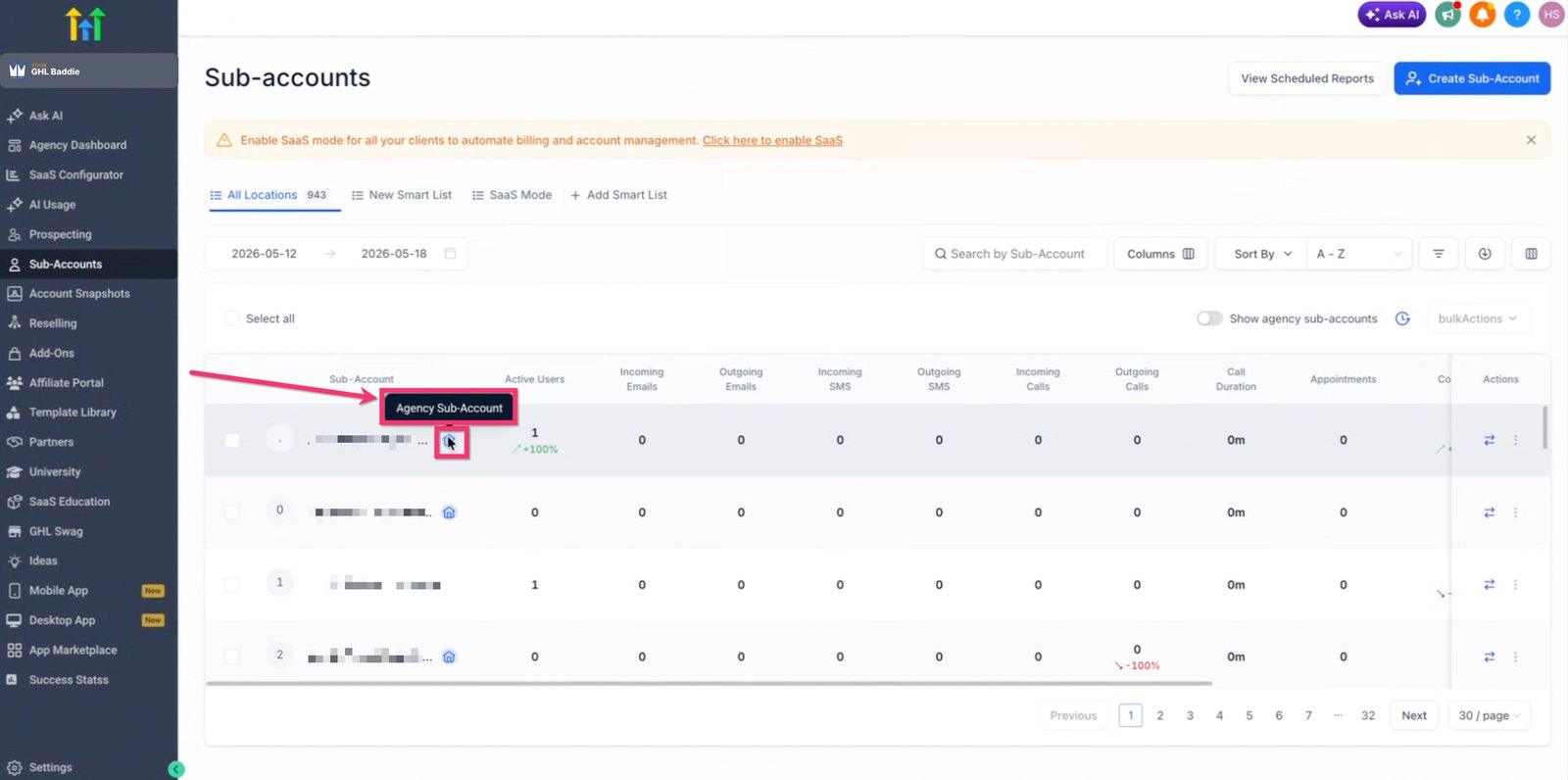
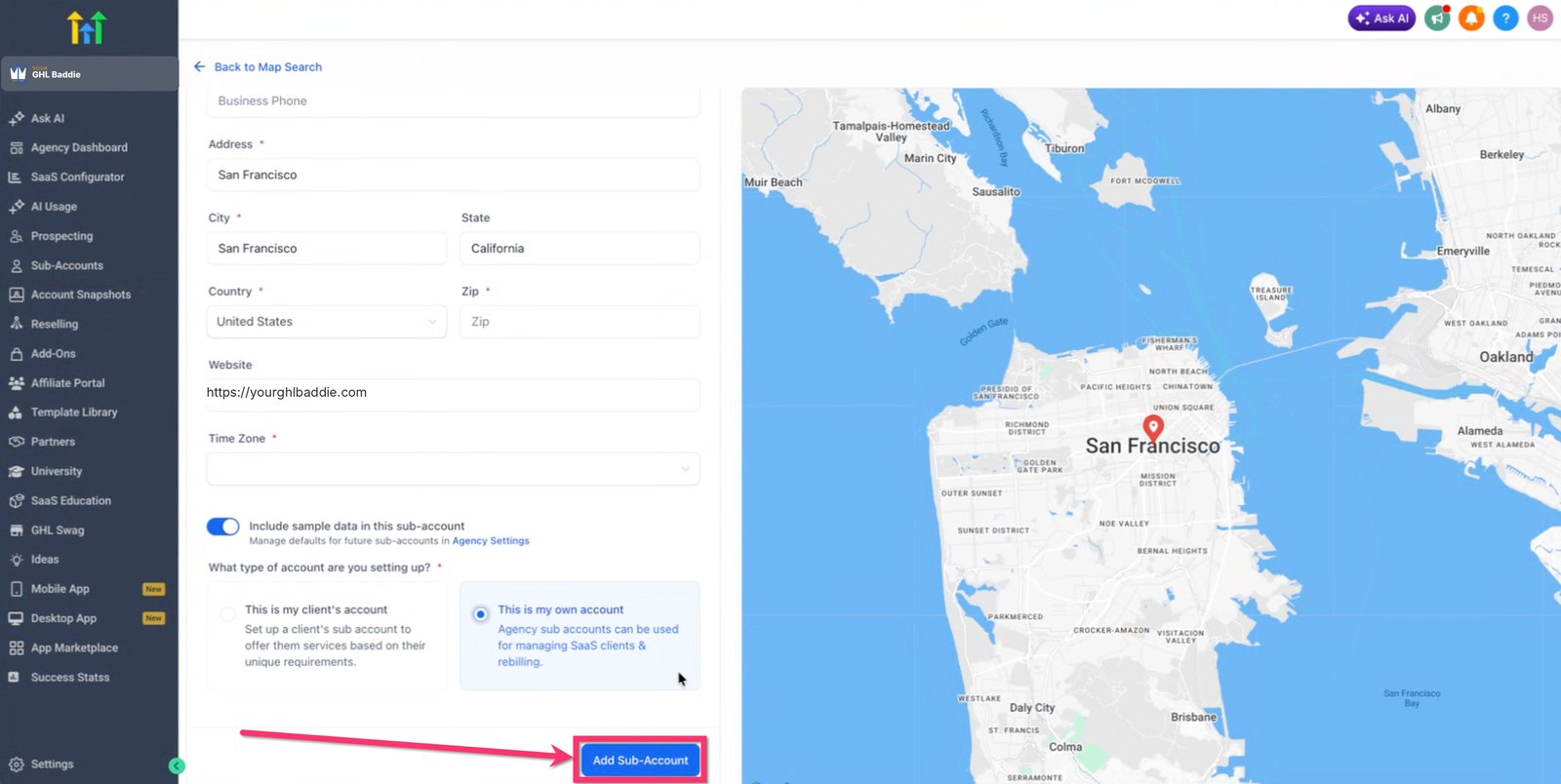
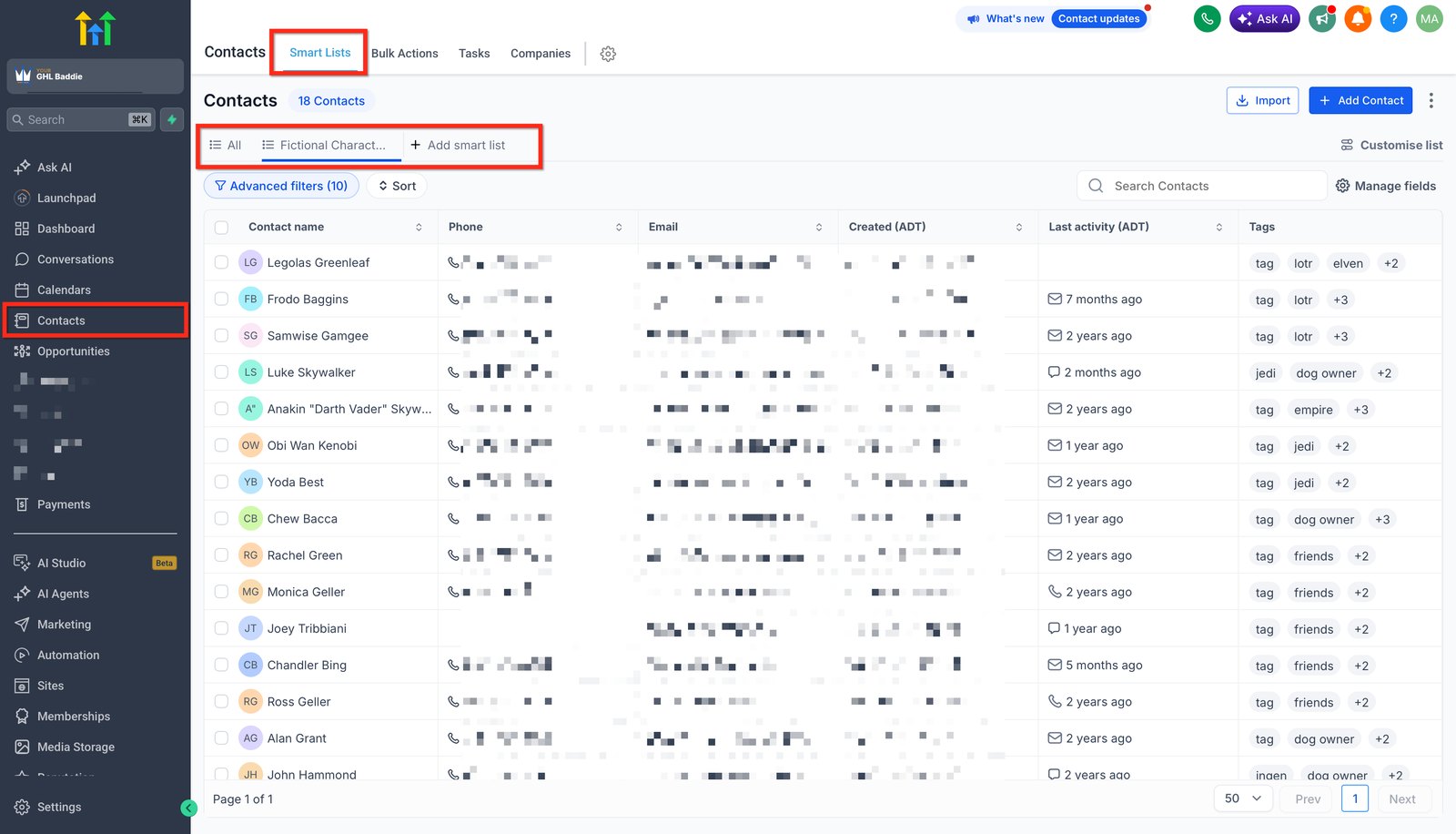
Hi baddie! I'm Hazel. GHL has two levels: the agency and the sub-account. Let me show you both. This is the agency level. Each row in Sub-accounts is one client's workspace. The agency can open any of them, and creates new ones with Create Sub-Account. Creating a sub-account asks for the business details, like address and website. Then you choose if it's a client's account or the agency's own, and click Add Sub-Account. And this is inside a sub-account. The menu is about running one business. This is where most VA work happens. Always read the account name before you build. Agency on top, one sub-account per client. That's the model. Read the lesson below, then take the quick check.
Hi baddie! Si Hazel 'to. Dalawa ang level ng GHL: agency at sub-account. Ipapakita ko pareho. Ito ang agency level. Bawat row sa Sub-accounts ay workspace ng isang client. Kaya ng agency buksan kahit alin, at gumagawa sila ng bago gamit ang Create Sub-Account. Pag gumawa ng sub-account, hihingin ang business details, tulad ng address at website. Tapos pipiliin mo kung account ito ng client o ng agency mismo, then click Add Sub-Account. At ito naman ang loob ng sub-account. Ang menu dito ay para sa isang business lang. Dito nangyayari ang karamihan ng VA work. Basahin lagi ang account name bago ka mag-build. Agency sa taas, isang sub-account bawat client. 'Yan ang model. Basahin ang lesson sa baba, tapos sagutan ang quick check.
What you'll learn
- Explain the difference between the agency level and a sub-account
- Know which level almost all VA work happens in
- Recognize which level you are looking at on screen
- Understand why your access might look different from a tutorial
- Ipaliwanag ang pagkakaiba ng agency level at ng sub-account
- Malaman kung saang level nangyayari ang halos lahat ng trabaho ng VA
- Makilala kung aling level ang nakikita mo sa screen
- Maintindihan kung bakit iba ang itsura ng access mo kumpara sa tutorial
New words in this lesson
- Agency account
- The top level of GoHighLevel, owned by whoever pays HighLevel. It creates and manages client sub-accounts.
- Sub-account
- One client's separate workspace inside an agency account, with its own contacts, workflows and settings. Where most VA work happens.
What a client actually asks
"I've added you as a user on our account. Can you set up the new lead form for the Cebu branch?"
Ang tanong ng client
"Inadd na kita bilang user sa account namin. Pwede mo bang i-set up ang bagong lead form para sa Cebu branch?"
Key concepts
GoHighLevel has two levels. Getting this straight now will save you a lot of confusion later.
The agency account is the top level. It belongs to whoever pays HighLevel, usually a marketing agency. From here they create and manage client accounts, set up billing and branding, and control who can access what.
A sub-account is one client’s workspace inside that agency. It has its own contacts, calendars, pipelines, workflows and settings, completely separate from every other client. Behind the scenes, GHL sometimes calls a sub-account a location — you’ll see that word in some settings and in the API.
Think of the agency account as a building manager and each sub-account as one apartment. The manager can open any apartment. Whoever lives in an apartment can only see their own.
Where a VA actually works
When the client at the top of this page says “I’ve added you as a user”, they almost certainly mean a user on their sub-account. That’s where nearly all day-to-day GHL VA work happens: building forms, pipelines, workflows and calendars for one business.
You might sometimes get agency-level access (for example, if you work for the agency itself and manage several clients). But for learning, and for most jobs, assume you’re inside a sub-account.
That’s exactly how you’ll practice here: Hazel adds you as a user on her practice sub-account, just like a client would. Lesson 3 shows you how.
Why tutorials sometimes look different
A lot of GHL content is made by agency owners for agency owners, so it shows agency menus you might never see. If you’re following along and a menu item is missing, first check which level you’re on. It’s usually an access difference, not a mistake on your part.
How to tell which level you’re in
Look at the account switcher, near the top of the left sidebar. Inside a sub-account it shows that business’s name. At the agency level it shows the agency, or a prompt to choose an account.
Look at the sidebar items. A sub-account sidebar is about running one business: Conversations, Calendars, Contacts, Opportunities, Automation, Sites. An agency sidebar is about managing many: a list of sub-accounts, agency settings, billing.
Before you build anything, read the account name. Out loud if you have to. Building a workflow in the wrong client’s account is a mistake almost everyone makes once.
Mga pangunahing konsepto
May dalawang level ang GoHighLevel. Kung malinaw na ‘to sa’yo ngayon, ang dami mong maiiwasang kalituhan mamaya.
Ang agency account ang pinakataas na level. Pag-aari ito ng nagbabayad sa HighLevel, kadalasan isang marketing agency. Dito sila gumagawa at nagma-manage ng client accounts, nagse-set up ng billing at branding, at kumokontrol kung sino ang may access saan.
Ang sub-account ay workspace ng isang client sa loob ng agency na ‘yon. May sarili itong contacts, calendars, pipelines, workflows at settings, hiwalay na hiwalay sa ibang clients. Sa likod ng eksena, minsan location ang tawag ng GHL sa sub-account — makikita mo ‘yang salitang ‘yan sa ilang settings at sa API.
Isipin mong building manager ang agency account at isang apartment ang bawat sub-account. Kayang buksan ng manager ang kahit anong apartment. Pero ang nakatira sa isang apartment, sarili lang niyang unit ang nakikita.
Saan talaga nagtatrabaho ang VA
Kapag sinabi ng client sa itaas na “inadd na kita bilang user”, halos siguradong ang ibig sabihin ay user sa sub-account nila. Diyan nangyayari ang halos lahat ng pang-araw-araw na trabaho ng GHL VA: pag-build ng forms, pipelines, workflows at calendars para sa isang business.
Minsan pwede kang mabigyan ng agency-level access (halimbawa, kung sa agency mismo ka nagtatrabaho at ilang clients ang hawak mo). Pero para sa pag-aaral, at para sa karamihan ng trabaho, isipin mong nasa loob ka ng sub-account.
Ganyan mismo ang pagpa-practice mo dito: ida-dagdag ka ni Hazel bilang user sa practice sub-account niya, gaya ng gagawin ng client. Ipapakita sa Lesson 3 kung paano.
Bakit minsan iba ang itsura ng tutorials
Maraming GHL content ang gawa ng agency owners para sa agency owners, kaya pinapakita nila ang agency menus na baka hindi mo kailanman makita. Kung sumusunod ka at may nawawalang menu item, i-check muna kung anong level ka. Kadalasan pagkakaiba lang ‘yan ng access, hindi pagkakamali mo.
Paano malalaman kung nasaang level ka
Tingnan ang account switcher, malapit sa taas ng left sidebar. Kapag nasa sub-account ka, pangalan ng business ang nakalagay. Kapag nasa agency level, ang agency ang nakalagay, o prompt para pumili ng account.
Tingnan ang mga item sa sidebar. Ang sidebar ng sub-account ay tungkol sa pagpapatakbo ng isang business: Conversations, Calendars, Contacts, Opportunities, Automation, Sites. Ang sidebar ng agency ay tungkol sa pag-manage ng marami: listahan ng sub-accounts, agency settings, billing.
Bago ka mag-build ng kahit ano, basahin ang account name. Kahit malakas pa kung kailangan. Halos lahat ay nagkamali na ng pag-build ng workflow sa account ng maling client kahit isang beses.
Common mistakes
- Nagbu-build sa maling sub-account
- Madalas may dose-dosenang client sub-accounts ang agency na magkakahawig ang pangalan. I-check ang account name sa switcher bago ka mag-build ng kahit ano — tuwing-tuwina.
- Umaasang makikita ang agency settings bilang VA
- Karamihan ng VA ay sub-account access lang ang binibigay. Kung may agency setting sa tutorial na hindi mo makita, normal 'yan — tanungin ang agency owner sa halip na isiping may sira.
- Akala kailangan ng bawat client ng sariling GHL subscription
- Sa agency model, ang agency ang nagbabayad sa HighLevel at gumagawa ng sub-account para sa bawat client. Kadalasan hindi na bumibili ng GHL ang client mismo.
- Building something in the wrong sub-account
- Agencies often have dozens of client sub-accounts with similar names. Check the account name in the switcher before you build anything, every single time.
- Expecting to see agency settings as a VA
- Most VAs get sub-account access only. If a tutorial mentions an agency setting you can't see, that's normal — ask the agency owner rather than assuming something is broken.
- Thinking each client needs their own GHL subscription
- Under the agency model, the agency pays for HighLevel and creates a sub-account per client. The client usually doesn't buy GHL themselves.
Knowledge check
5 quick questions. You'll see why each answer is right or wrong as you go, and you can retake it as often as you like.